collated by Fancyrolles
前言
参考:《Head First JAVA》Runoob_JAVA JAVA SCHOOL
CS 61A MIT youtube JAVA书目大全200本
Tips:如果在墙内,不懂多看csdn。csdn净化Tampermonkey插件
CSDN/知乎/哔哩哔哩/简书免登录去除弹窗广告by T_Tg
微博免登陆查看全文、CSDN免关注展示全文by zzy
如果你对于配置java编译器相关并不了解,就尽量使用课程指定的编译器和对应版本。
本课程CPT111对于毫无编程基础和编程思想的小白来说有一定难度,在后面的课程十分凌乱和跳跃。**如果说想只通过本课程掌握Java,这是错误的,如果说只通过某些大众JAVA网课学习来学习本课程,这是困难且耗时的。**可以理解为,本课程类似于制定游戏规则,而你在游戏规则下get higher score。谨记从上课材料和上课要求的库出发解决问题,多写多练多讨论多花时间多用gpt和搜索引擎,相信你能获得一个不错的成绩。此外,英语学习是本课程最重要的部分之一。本文并不能保证所有内容都为正确,有错误见谅。
因为这只是我个人的笔记,而且我自己也菜的不行,天天有空翘课摆大烂,相信看到这材料的人个个都比我努力。可是没有人打破这个信息差,那我就来打破好咯。禁止任何商业目的的转载和摘编。(文中有很多超链接,按住ctrl点击访问)
本学期课程学分分布如下:平时分拿到了之后基本不挂科,但是高分难度很高。
小占比:Lab出勤签到+每周CW
大占比:学期中后CW大作业得分(CW3)+期末考试
23-24期末考试:形式:机考
内容:31道题。MCQs居多,定义&理论题占比大。大题除了一题递归其余都是填空(继承等..)注意上下大题可能会有关联。大题难度不高其实。
开卷考试:允许携带U盘(仅pdf文件)和纸质资料。
考试模式:考试时开启监控软件。只能使用四个窗口,LMO、两个编译器、PDF查看器。
我的评价:看懂理论题>我会写代码。

(u1s1可以带一本字典) 修订于24/1/10
以下是每节课的链接:
两个文件编排不一样,但是内容没有实质变化。
(篇幅过长不好用整篇用博客框架来写)
I.The first java class11.ASCII – American Standard Code for Information Interchange
II.The second java class1.byte
2.short
3.int (default)
4.long
*declaration 声明 definition 定义 initialization初始化 assignment赋值 区分
本文大多数地方直接复制过来都没有特意搞这个!X
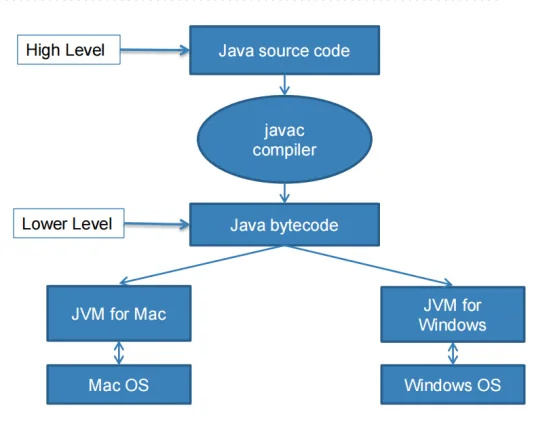
JAVA编程中source code和bytecode有什么区别
编译器和解释器之间有什么区别
III.The third java class IV.The fourth java class V.The fifth java class40.Object Oriented Programming
2.Primitive data types (int, double, boolean etc.) store an actual value
”Integer.toString(3)”
15.Primitive variables and Object variables
*Mid-ReviewTest Client, Object Instantiation 测试客户端,对象实例化
Class Variable / Static Variable
Overriding&Overloading&Overflowing的区别
VI.The sixth java classSubclass and Superclass
1.Encapsulation
2.Review: Overloading
3.Inheritance
4.Overriding
5.Polymorphism
6.In-Class Quiz 9.7: Polymorphism
7.In-Class Quiz 9.6: Overriding (The reason of 95)
Exception 1:ArrayIndexOutOfBoundsException
Exception 2:Runtime Error
Exception 3:Throwing exception object
Catching an exception object 1
VII.The seven java class51.creating, writing to and reading from a file
1.Data
2.Absolute file name
3.Relative file name
53.Creating a new file using PrintWriter
58.Reading csv data using Scanner
*JavaFX VIII. The eighth java class IX.The ninth java class X.The tenth java classThe First Class
1.First java program
public class Hello {
public static void main(String[] args) {
System.out.println("Hello World");
}
}
Output:Hello world2.Java Virtual Machine (JVM)
[
](https://imgse.com/i/pF1uiYn) New project 后大概如图所示 src是文件目录 以下是创建文件示意图 [
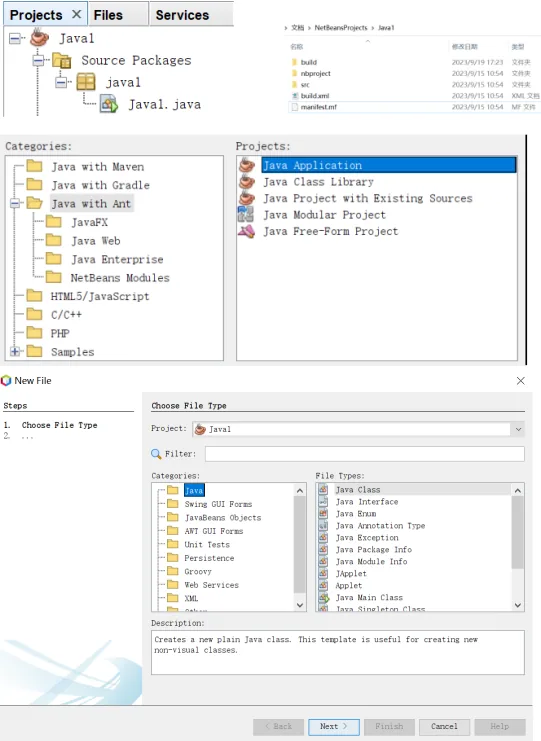
3.Which PART?
class / main method / statement / semicolon / braces / squared / brackets / parentheses / parameterpublic class Hello { //classpublic static void main(String[] args) { //main methodSystem.out.println("Hello World"); //statement} //parentheses圆括号 parameter参数} //semicolon 分号 braces 大括号 squared 方括号 brackets 中括号 [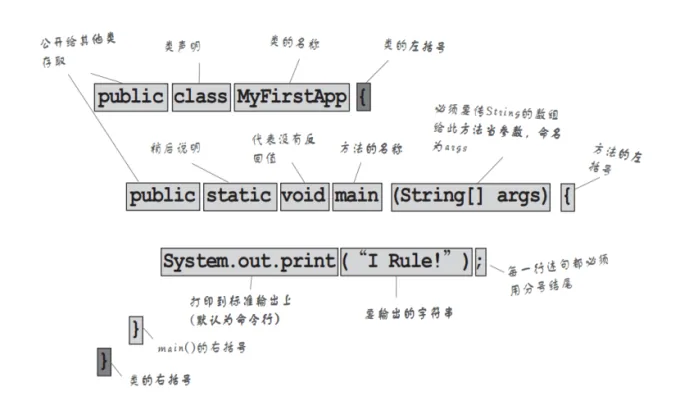
4.Object-Oriented Language
面向对象设计语言:JAVAJava is an Object-Oriented Language:
○ every Java file must contain a class类declaration声明
○ all code代码 is written inside在 a class 类
○ to run a Java program, need to define a main method定义主方法
5.IN-class-quiz
public class Hello {public static void main(String[] args) {int num = 5;num = num + num;System.out.println(num);}}Output: 106.TIPS:
○ single quote ' 单引号’○ double quote ” 双引号”
○ new line character n 新一行Enter
○ backslash \ 反斜线
7.For Example
7 + 4 = num16 + 4 = num2System.out.println(‘’num1 + num2 = ‘ + (num1 +num2) + ‘’’)Output: ‘num1 + num2 = 21’Println输出换行
print 输出接上
8.Binary, Bit and Bytes
To a modern computer, everything is binary○ 1 bit is 1 binary digit: 0 or 1 ; ON or OFF ; TRUE or FALSE
● Every bit we add doubles the total we can represent
○ 1 bit – 2
○ 2 bits – 4
○ 3 bits – 8
○ 4 bits – 16
○ …
○ 8 bits – 256 – one Byte
● Mathematically: n bits yields 2n patterns (2 to the n-th power)
8 bits = 1 byte ≈ often 1 character, e.g. “a”
1024 bytes = 1 kilobyte ≈ several paragraphs
1024 kilobytes = 1 Megabyte ≈ about 200 pages of text
1024 Megabytes = 1 Gigabyte ≈ 256 MP3 files
1024 Gigabytes = 1 Terabyte ≈ 40 large movies
9.Hexadecimal
● Base 16 numbering system0, 1, 2, 3, 4, 5, 6, 7, 8, 9, A, B, C, D, E, F
● Represented with 0x__
i.e. 255 in decimal is 0xFF
● More readable than binary 比二进制更可读
decimal 121 10进制
binary 01111001 2进制
hex 0x79 16进制
● Stores more information than binary 存储比二进制文件更多的信息
hex and binary relate well 十六进制和二进制之间的关系很好
1 hex digit can always be represented with 4 binary digits
1个十六进制数字总是可以用4个二进制数字表示
no relationship like this between decimal and binary
10.24-bit Colour
● 24-bit colour means that there are 24 bits allocated for RGB channels为RGB通道分配了24位
○ 8 bits for red, 8 bits for green, 8 bits for blue 红绿蓝
● How to represent this colour purple?
○ rich purple? deep purple?
● Need a better representation
○ often use hexadecimal 0xd400ff
○ what does that mean? 0x是十六进制的开头
● Hex 0xd400ff
○ d4 – red bits
○ 00 – green bits
○ ff – blue bits
● Compact, as opposed to 24-bit value for this colour purple
○ 110101000000000011111111
11.ASCII
ASCII = American Standard Code for Information Interchange● Recall, computers can only store binary
○ includes characters
● ASCII is an encoding scheme 编码方案
that represents each character
with a 7-bit value
12.What’s Java?
●Created by James Gosling Modern object-oriented language Continuously improved since 1990s● Widely used
Mars rover, cell phones, web servers, …
● Unfortunately, Java is verbose Using more words – compare with Python!
● More importantly, it is not about the language
The programming skills that you learn in this course will apply to many Languages
13.JAVA basic principle
Case sensitive:Java is case sensitive, This means that the identifier Hello is different from the hello.大小写区分
Class name: For all classes, the initials of the class name should be capitalized. If the class name consists of several words, then the first letter of each word should be capitalized, such as MyFirstJavaClass.
类名命名:每个单词首字母大写
Method name: All method names should start with lowercase letters. If the method name contains a number of wordm90 |s, the following first word is capitalized.
方法名命名:小写字母开头,但是若干单词后面每个单词首字母大写
Source file name: The source file name must be the same as the class name. When saving a file, you should save the class name as a file name (remember that Java is case sensitive), and the file name is 后缀suffix. java.(If the file name is not the same class name).
文件名必须是类名
Main method entry: All Java programs are executed starting by the public static void main (String [] args) method.(所有程序必须从该方法开始执行)
[>>返回总目录<<](https://www.fancivoid.asia/technology/xjtlu_cpt111_java-programming-biji/#%E4%BB%A5%E4%B8%8B%E6%98%AF%E6%AF%8F%E8%8A%82%E8%AF%BE%E7%9A%84%E9%93%BE%E6%8E%A5%EF%BC%9A)The Second Class
14.JAVA data types
Java data types - integer data 整数数据
Integers (to non-mathematicians) are whole numbers, numbers with no fractional part, no decimal point.以下四种< >
1.byte
8 bits -128 to 127 (0 to 255)Bytes. e.g., individual bytes of image data; in 32 bit images there is 1 byte each for red, green, blue and alpha (transparency)
字节数。例如,图像数据的单个字节;
在32位图像中,红、绿、蓝和alpha(透明度)各有一个字节
2.short
16 bits -32,768 to 32,767To save memory – instead of int. However, in most JVMs they are 32-bit anyway, so useless.
要保存内存-而不是int。然而,在大多数jvm中,它们都是32位的,非常没用。
3.int (default)
32 bits -2^31 to 2^31 - 1Everything except very big/very negative values. This is the default.
除了非常大的/非常负的值。这是默认值。
4.long
64 bits -2^63 to 2^63-1long bigNumber = 300000000000000000L;
You will probably use
int 95%+ of the time, long sometimes, and byte occasionally.
实用度 int>long>byte
Java data types - floating point非整数
1.float
32 bits+-10^38 approx.
7 significant digits (decimal) float f = 1.375f;
2.double
64 bits +-10^38 approx. 15 significant digits (decimal) Defaulte.g.
int a = 1000000000;
long b = 1000000000000000000l;
double c = 31.32;
float d = 31.01f;
Java data types - Strings 字符串
As introduced last week, can also use StringsStrings
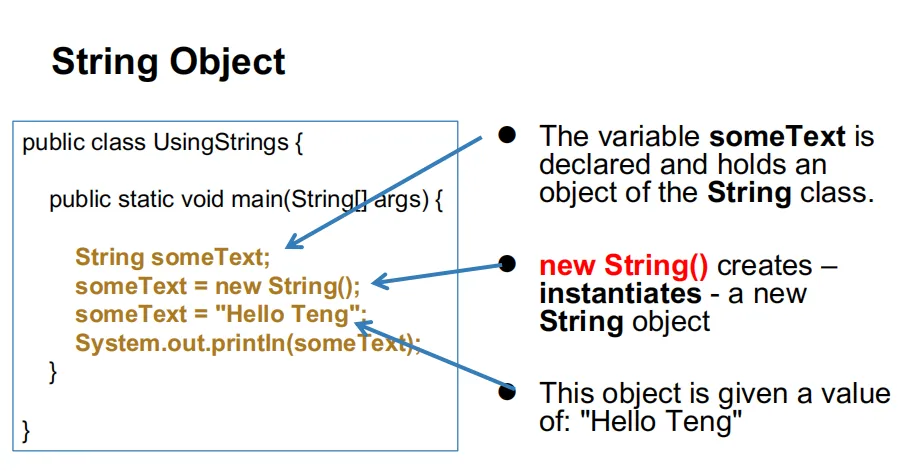
String are objects, and have many methods○ At basic level, can store text data
○ Note, double quotes needed around string
E.g. String str = “This is a String”;
Char
represents a character ('a', 'b', 'c', etc)A different data type
includes non-Roman characters (Chinese, Cyrillic, Arabic, Greek etc)
○ It is actually a 16 bit integer, range 0 - 65,535
Java data types - Boolean
Boolean
● We can also store True/False information● Boolean (means true or false)
Discussed later in the module
Cannot store anything except this
Very useful for checking if conditions are met
Its size varies; it only uses 1 bit, but can take up to 32 bits of memory!
boolean bool = false;
15.Assigning variables
*declaration 声明 definition 定义 initialization初始化 assignment赋值
declaration 存在此变量不占用空间definition 为变量分配空间 (通常这两个过程是一起的)
initialization初始化 定义后需要一个确定的初始化过程(从无到有)
assignment 赋值 给予一个数值(从有到有)
Instantiate 实例化 把用类创建对象的过程称为实例化。是将一个抽象到具体的过程
Assigning different types of variables We can declare and assign separately
int intNum; // declare a variable (assigned a default value) ①intNum = 22; // assign a new value ② ①+② int intNum = 22; // initializedouble doubNum = 22.0;float floatNum = 12.3f;String strData = "Twenty two";boolean boolData = true;char charVal = 'c';16.Arithmetic operators 算子
Operator Description
- Addition operator
(also used for joining Strings) (called String concatenation) 连接算符
- Subtraction operator
- Multiplication operator
/ Division operator
% Modulo (remainder) operator(取余)
++ 自增 +1 —自减 -1
17.Java Arithmetic 计算实战
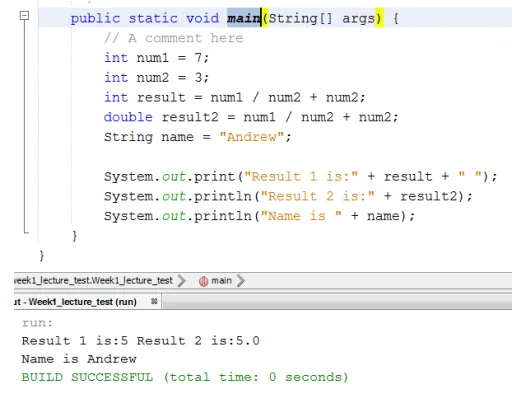
①int num1 = 3;int num2 = 4;int result = num1 / num2 ;System.out.println(result);Result = 0 //Remember, integers can only use whole numbers②double num1 = 3;double num2 = 4;double result = num1 / num2 ;System.out.println(result);Result = 0.75③double num1 = 7;double num2 = 3;double result = num1 / num2;System.out.println(result);Result = 2.3333333333333335④int num1 = 7;int num2 = 3;int result = num1 / num2;System.out.println(result);Result = 2/* Why? Because an integer can only store wholenumbers○ Anything after the decimal point is simply ignored○ Can cause coding errors, but can also be useful…浮点精度(float、double)运算不精确的原因 */⑤int num1 = 7;int num2 = 3;int result = num1 / num2;System.out.println(result) //ignore the decimal pointResult = 2⑥int num1 = 7;int num2 = 4;int result = num1 % num2;System.out.println(result); //calculate the remainderResult = 3⑦int num1 = 7;int num2 = 3;int result = num1 / num2 + num2;System.out.println(result);Result = 5⑧int num1 = 7;int num2 = 3;int result = num1 / (num2 + num2);System.out.println(result); //⑦&⑧:order differentResult = 1*Operator Precedence
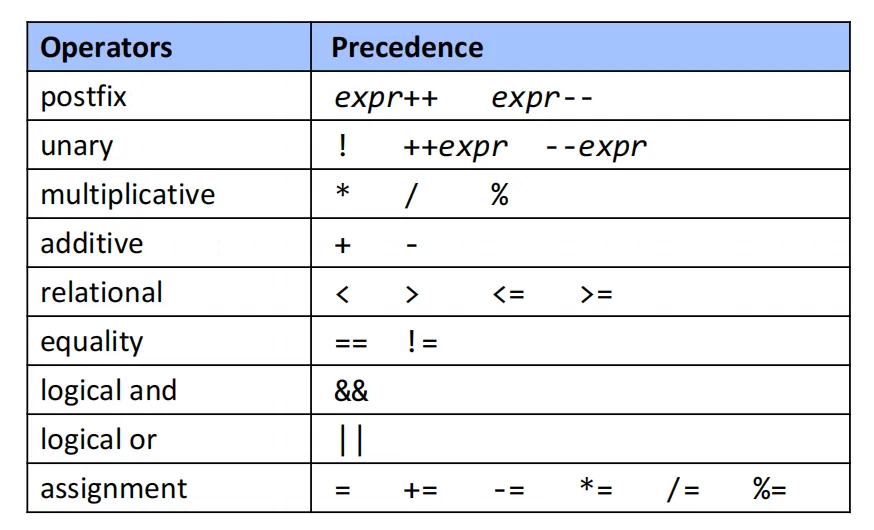
First 1.++ — 2.() 3.* / % 4. + - Last
18.Unary Operators
++ Increment operator; increments a value by 1— Decrement operator; decrements a value by 1
int a;a = 41;a++;System.out.println("a = " + a);a--;System.out.println("a = " + a);Output=a = 42a = 41// Another way of expressing ita += 2; a = a + 2;
a -= 3; a = a - 3;
a *= 3; a = a * 3;
19.mathematical function
Such as Square root, Random numbers有一说一,很多时候平方不如直接做乘法,因为可能会因为精度不够造成错误结果。
double root = Math.sqrt(num)//平方double root = Math.max(num1,num2);//取大值double rand = Math.random()/*will be between 0.0 and 1.0, but not including 1.0, in set symbol [0.0, 1.0).If you want to expand the range, you can use multiply*/| Method | Description | Return Type |
|---|---|---|
| acos(x) | Returns the arccosine of x, in radians | double |
| asin(x) | Returns the arcsine of x, in radians | double |
| atan(x) | Returns the arctangent of x between -PI/2 and PI/2 radians | double |
| exp(x) | Returns the value of E^x | double |
| expm1(x) | Returns e^x-1 | double |
| floor(x) | Returns the value of x rounded down to its nearest integer | double |
| hypot(x, y) | Returns sqrt(x^2 +y^2) without intermediate overflow or underflow | double |
| log(x) | Returns the natural logarithm (base E) of x | double |
| max(x, y) | Returns the number with the highest value | double|float|int|long |
| min(x, y) | Returns the number with the lowest value | double|float|int|long |
| pow(x, y) | Returns the value of x to the power of y | double |
| random() | Returns a random number between 0 and 1 | double |
| round(x) | Returns the value of x rounded to its nearest integer | int |
| signum(x) | Returns the sign of x | double |
| sin(x) | Returns the sine of x (x is in radians) | double |
| sqrt() | Returns the square root of x | double |
| tan(x) | Returns the tangent of an angle | double |
| toDegrees(x) | Converts an angle measured in radians to an approx. equivalent angle measured in degrees | double |
| toRadians(x) | Converts an angle measured in degrees to an approx. angle measured in radians | double |
20.Triangles - Hypotenuse
Pythagorean theorem| Method | Description | Return Type |
|---|---|---|
| hypot(x, y) | Returns sqrt(x^2 +y^2) without intermediate overflow or underflow | double |
| pow(x, y) | Returns the value of x to the power of y | double |
| sqrt(x) | Returns the square root of x | double |
/* pow(x,y) = x^yhypot(x,y) = sqrt(x^2+y^2)Sqrt(a) =√a*/double a = 4;double b = 3;double c = Math.sqrt(Math.pow(a,2) + Math.pow(b,2));System.out.println("Value of C is " + c);Output: Value of C is 521. Angles of triangle
● Can use SOH CAH TOA● SOH = Sin – Opposite and Hypotenuse
● CAH = Cos – Adjacent and Hypotenuse
● TOA = Tan – Opposite and Adjacent
asin acos atan 反三角函数
toDegrees(x) 弧度转角度
toRadians(x) 角度转弧度
double opp = 2;double adj = 4;double val = Math.atan(opp/adj);double deg = Math.toDegrees(val);System.out.println("Angle is " + deg);22.Initial Programming
Last class we made simple programsEverything in main method. ints, doubles, Strings System.outs Not interactive [
23.The Scanner Object
The Scanner object is a useful way to receive the System.inputcharacter stream, i.e. accessing characters that you type. Like a String, a Scanner is an object (we will discuss this in future weeks) It contains a number of useful methods Its purpose is to receive and handle keyboard input. It is a very useful way to provide input to your program. It wraps your character stream into a Scanner object, which has methods you can use to access it.
Scanner for keyboard
We can create a new Scanner object easily:
Scanner kb = new Scanner(System.in);
We can then use it to receive and store an input
String next = kb.nextLine();
Useful to use a System.out to prompt user Input can be stored as a variable and used
System.out.println(“Name is ” + next );
Scanner kb = new Scanner(System.in);System.out.println("Input name");String next = kb.nextLine();System.out.println("Name is " + next);No package was added when entered
add import for java Using Package [
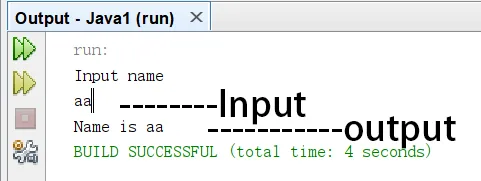
24.Convert data type
[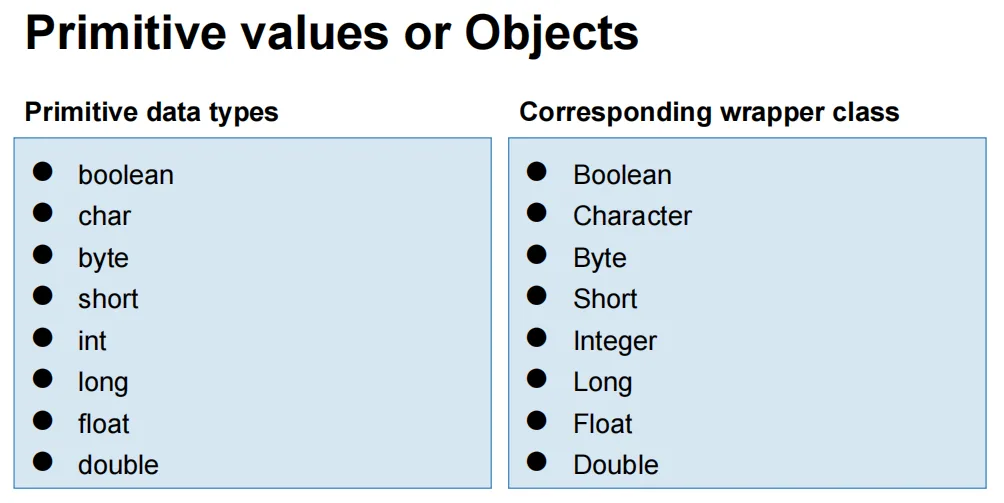
](https://imgse.com/i/pF3ABnJ) ● In fact, there are classes for ALL primitive data types
● They are called ‘wrapper classes’.
String s = "999"int res = Integer.parseInt(s);String s = "99.021"double res = Double.parseDouble(s);boolean x = false;String m = Boolean.toString(x);// 此种代码的作用就是把字符串转化为对应的数据类型 前提是转化的数据public static int getDice() {double rand = (Math.random() * 6);int r = (int) rand;return r;}算子int
y = (int) x // 此类算式就是正常的取整计算 结合上文的计算 Scanner Input
public static void main(String[] args) {Scanner kb = new Scanner(System.in);System.out.println("Input a number");String next = kb.nextLine();int num1 = Integer.parseInt(next);}● We can convert our String to an integer or double!
● Get input from Scanner
● Run a conversion, store as integer
Variant: (using two inputs for addition, output and)
// 变式:(采用两个输入做加法,输出和)public static void main(String[] args) {Scanner kb = new Scanner(System.in); //建立一个scanner Input输入System.out.println("Input a number"); //提示输入String next = kb.nextLine(); //下一行输入int num1 = Integer.parseInt(next); //输入1System.out.println("Input a number"); //提示输入String next2 = kb.nextLine(); //下一行输入int num2 = Integer.parseInt(next2); //输入2int res = num1+num2; //进行加法System.out.println("Total is " + res); //输出结果}25.Good programming style
● Your programming code must be easily read by others and byyourself.
● This saves time during program maintenance.
● It also leads to less human induced error.
● In software development projects, maintenance often accounts for 80% of effort.
● Program readability is of utmost importance.
就是说一个好的格式能事半功倍,包括空白行、空格、变量的代称、说明等。
/* … */多行注释
//单行注释
Add blank lines to Improve readability
添加空白行以提高可读性
Put a space between each term
在每个术语之间放一个空格
importHtml 规定的缩写首字母大写 importHTML
message 不要用日常的缩写 msg
26.Lab learning
Write a Java program that takes two input integers, min and max, from the user, andgenerate two random integers between min and max, inclusive After that, print two two random integers and report whether one is smaller, equal to, or larger than the other
Use boolean value (true or false) to report the comparison between the two random integers
Your program’s input/output interaction should look like:
[
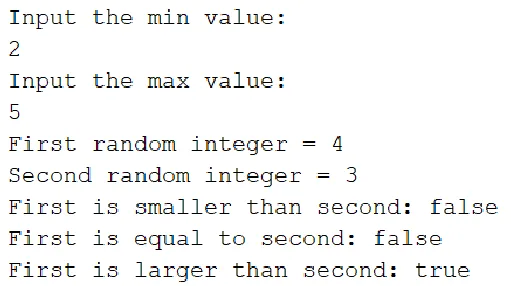
](https://imgse.com/i/pF3EJDH)
Boolean can just output true/false.
Boolean Specifies whether it is true or false, just like if.
Math
Math.round () 四舍五入函数,(int) Math.round() 四舍五入后转化为整数类型。
Math:这是Java标准库中的一个类,它包含了各种数学函数和常数。
round():这是Math类中的一个方法,用于将一个浮点数值四舍五入到最接近的整数。例如,如果你有一个浮点数值 3.6,Math.round(3.6) 将返回 4。
(int):这是一个类型转换操作符,用于将一个值从一种数据类型(在这种情况下是浮点数)转换为另一种数据类型(在这种情况下是整数)。
Math.Pi: 调用π的值
In second lab, we use the (int) Math.round() to change the double type to integer type.
Also don’t forgot how to change string to int/double.
int num1 = Integer.parseInt(next);double num2 = Double.parseDoule(next);Math.pow(n,2)也就是n^2。
27.CW1&CW2 learning
A bit A byte A kilobyte A megabyte A gigabyte A terabyte From small to largeJava is a high level language which means that it looks similar to C++ and is easier for humans to read compared to low level languages such as assembly . All Java programs run inside the Java Virtual Machine. Programmers write the source code in Java and then the compiler turns this into a file containing bytecode . The Java Virtual Machine then works as a/an interpreter when it is running the program.
JAVA编程中source code和bytecode有什么区别
int i =10;
The variable i is both declared and initialised. >>返回总目录<<
The Third Class
[
](https://imgse.com/i/pF35UiV)
28.Boolean Operators
The data type that is frequently used called boolean○ from mathematician George Boole
○ Boolean algebra
Boolean expression 布尔表达式 it just have two values — true or false.
public class BooleanValues {public static void main(String[] args) {boolean a = true;boolean b = false;System.out.println(a);System.out.println(b);}}Output:truefalse29.if statement
if(布尔表达式) {//如果布尔表达式为true将执行的语句}if(布尔表达式 1){ //如果布尔表达式 1的值为true执行代码}else if(布尔表达式 2){ //如果布尔表达式 2的值为true执行代码}else if(布尔表达式 3){ //如果布尔表达式 3的值为true执行代码 }else { //如果以上布尔表达式都不为true执行代码}30.While statement
while( 布尔表达式 ) {//循环内容}//先进行布尔表达式的判断,为true,执行循环内容;为false,停止执行循环。do { //代码语句}while( 布尔表达式 );/*先执行一次循环,再进行布尔表达式的判断,为true,执行循环内容;为false,停止执行循环。*31.For statement
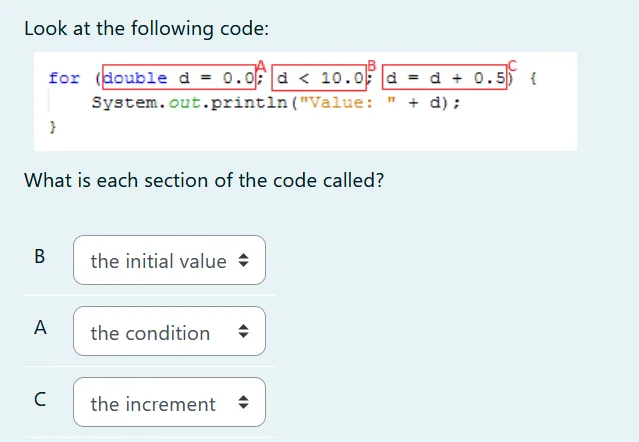
for(初始化; 布尔表达式; 更新) { //代码语句}For nest //嵌套public static void main(String[] args) { System.out.println("乘法口诀表:"); // 外层循环 for (int i = 1; i <= 9; i++) { // 内层循环 for (int j = 1; j <= i; j++) { System.out.print(j + "*" + i + "=" + j * i + "t"); } System.out.println(); }}/*"for-each"循环(也称为增强型for循环或foreach循环)for(声明语句 : 表达式) { //代码句子 }*/public class Test { public static void main(String[] args){ int [] numbers = {10, 20, 30, 40, 50}; for(int x : numbers ){ System.out.print( x ); System.out.print(","); } System.out.print("n"); String [] names ={"James", "Larry", "Tom", "Lacy"}; for( String name : names ) { System.out.print( name ); System.out.print(","); } }}32.break
break in loop statement or switch statement ,Used to jump out of the whole sentence block.break : direcforce exit the cycle
break;33.loop
Countdown with While
int countdown = 10; // initialize counterwhile(countdown > 0) { // looping conditionSystem.out.println(countdown);countdown = countdown - 1; // update}System.out.println("Go!");For Loop Summary
-
The loop is first initialised with a value, which can be any number
-
A condition is then checked. If this is met, then the content is processed
-
The next stage is to increment the loop
-
Next, the condition is checked again. If it is still met, then the content is processed again and then incremented
-
This process repeats until the condition is no longer met
34.Store a group
*这里介绍了一些常用的技巧。Arrays Visualised
int[] myArray = new int[5];myArray[0] = 100; myArray[1] = 200; myArray[2] = 300;myArray[3] = 400; myArray[4] = 500;• Arrays have a variable or a property called length• Here myArray.length will return 5• However, if you trymyArray[5] = 600;you will get an error: ArrayIndexOutOfBoundsException
Array initialization [计]数组初值,数组预置值 [
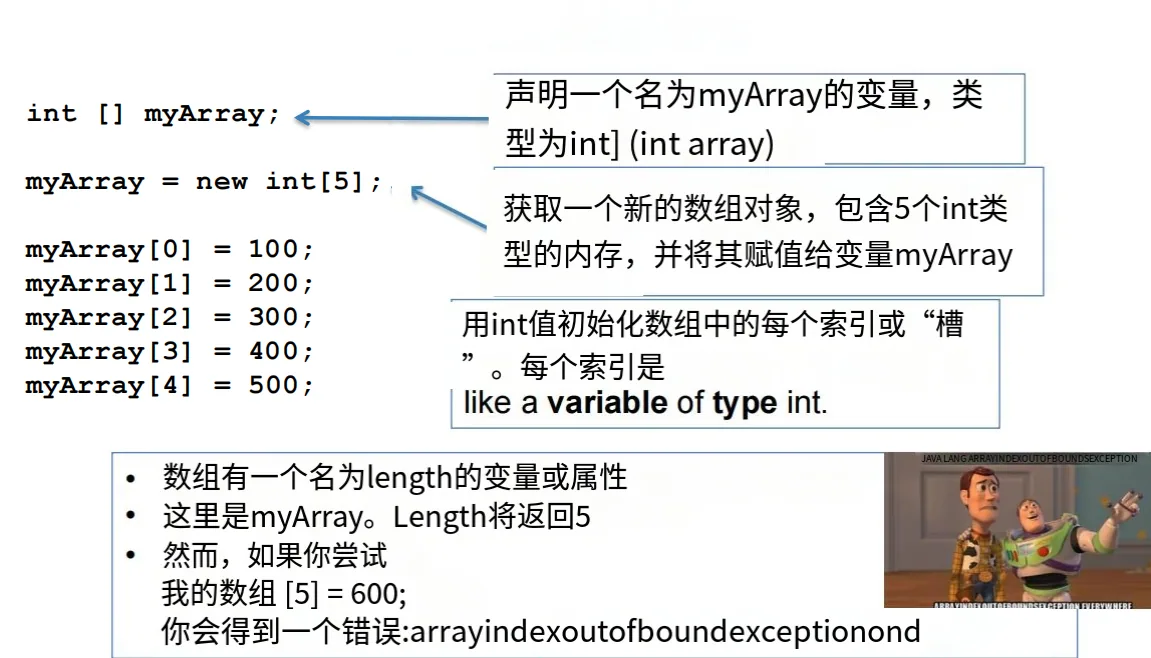
](https://imgse.com/i/pF3IESU) Array Types 数组类型
When created, arrays are automatically initialized
with the default value of their type. E.g.
String[] s = new String[100];// default values: nullboolean[] b = new boolean[4];// default values: falseint[] i = new int[10];// default values: 0Changing an Array Value 更改数组值
String [] myArray = {"a", "b", "c", "d", "e"};myArray[1] = "hello"; //"a", "hello", "c", "d", "e"myArray[4] = "bye";//"a", "hello", "c", "d", "bye"Using an Array Value //使用数组值String [] myArray = {"a", "b", "c", "d", "e"};System.out.println("Value is " + myArray[1]);Value is bArray Lengths 阵列长度
String [] myArray = {"a", "b", "c", "d", "e"};int len = myArray.length;boolean[] myArray = {true, false, true};int len = myArray.length;For Loops and Arraysfor (int i = 0; i < myArray.length; i++) {System.out.println(myArray[i]);}Output:abcdeLooping Dice
public static void main(String[] args) {for(int i = 0; i < 4; i++) {double rand = ((Math.random() * 6) + 1);int dice = (int) rand;System.out.println("Result is " + dice);}}Useful Information Storage
public static void main(String[] args) {int[] diceList = new int[4];for(int i = 0; i < 4; i++){double rand = ((Math.random() * 6) + 1);int dice = (int) rand;diceList[i] = dice;System.out.println("Result is " + dice);}}Find the Total
int total = 0;for (int i = 0; i < diceList.length; i++) {total = total + diceList[i];}System.out.println("The total is " + total);35.Methods
Main methodpublic static void main(String[] args) {}Declaring a methodpublic static int addTwoNumbers() {/* The first line is the method header */int result = 3 + 5;return result;}/*Our methods are public static also called static method or function we will explain this in future weeks for now, don’t worry about this!公共静态方法Method must have a nameo (almost) any name you likeo Should be meaningfulo Should tell us what the method doesDeclaring● A method is a code block● Need to use curly brackets to mark beginning and end */Declare type in header
Method must return a type
○ What we want out of the method
○ void for nothing
○ int for an integer
○ boolean for a boolean
Used in 2 places
– Declare type in header
– Return a value
Return
void for nothing
Can return nothing
○ Use void
○ Do not return anything
Declare type in header
• Useful for displaying
– otherwise, return the value to
be printed by other methods!
int for an integer
boolean for a boolean
Calling a method in main
public static void main(String[] args) {int total = addTwoNumbers();System.out.println("Total is " + total);}public static int addTwoNumbers(){int result = 3 + 5;return result;}Method Parameter
public static int addTwoNumbers(int num1, int num2) {int result = num1 + num2;return result;}Calling method with Parameters
public static void main(String[] args) {int total = addTwoNumbers(3, 5);displayTotal(total);}public static int addTwoNumbers(int num1, int num2) {/*参数及其类型*/int result = num1 + num2;return result;}Dice
public static int[] generateDice(int[] input) {// Loop for length of arrayfor (int i = 0; i < input.length; i++) {// Dice generation codedouble rand =((Math.random() * 6) + 1);int dice = (int) rand;input[i] = dice;System.out.println("Result is " +dice);}// return the arrayreturn input;}Finding Max Value
public static int findMax(int[] input) {// Set default max value as being the first valueint max = input[0];// loop round array, starting from the second valuefor (int i = 1; i < input.length; i++) {// check each value, if greater than current maxif (input[i] > max) {// set the max to be the new valuemax = input[i];}}// return the chosen max valuereturn max;}The Fourth Class
Rewiew
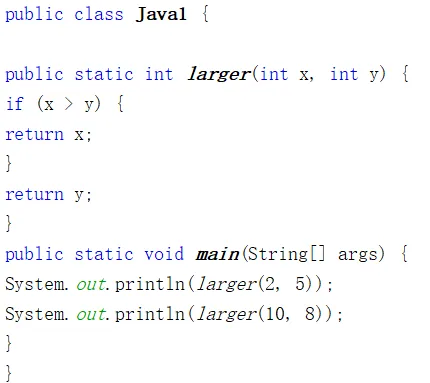
Rewiew 用方法比大小
[
](https://imgse.com/i/pF3jpg1)
36.Java function
Java function & static methodMath.random(),randomnumber
Integer.parseInt(),transform into Int
A function can be available
○ create a name
○ declare type and name of parameter(s)
○ specify type for return value
○ implement body of method
○ finish with return statement(s)
○ Char toUpperCase(char c) , to uppercase
○ Char toLowerCase(char c) , to lowercase
○ String toString(char c) , to a String object consist of one character String.substring(A,B) 第A个数到第B个数的字符串(从0开始)
chatAt
37.Scop
Global variables and local variables
public static void printInts(int[] nums) {System.out.print("[");for (int i = 0; i < nums.length; i++) {if (i != nums.length-1)System.out.print(nums[i] + ", ");elseSystem.out.print(nums[i]);}System.out.println("]");}public static void main(String[] args) {int[] arr = {1, 2, 3};printInts(arr);}Notice the scop of “nums” “i” “args” “arr”
Use global variables sparingly
38.Method Signature
Definition: Two of the components of a method declaration comprise the method signature—the method's name and the parameter types. 方法声明的两个组件构成了方法签名 - 方法的名称和参数类型。public double calculateAnswer(double wingSpan,int numberOfEngines,double length, double grossTons) {//do the calculation here}[
39.Char
Char ‘some character’The Fifth Class
//从这节课开始,课程内容异常抽象,请尽量适应。
不理解可以参考b站视频P64-70,至少能把代码写出来。
40.Object Oriented Programming
1.static final关键字
方法的构成 [修饰符(public private 关键字)返回值类型 方法名(参数列表){内容} ]
2.Primitive data types
(int, double, boolean etc.) store an actual value什么是主类型(Primitives data types)
3.Primitives have no methods
○ Only the value什么是原语(Primitives)?
4. Wrapper Classes包装类
Integer, string… are primitives data type. But We can wrap the primitive to access useful methods
Although an int is a primitive, an Integer allows us to treat it as an object, and so there are a number of methods, such as Compare() toString() etc. that we can access.
For example,”Integer.toString(3)”contains "wrapper class"(integer), "method"(toString)"parameter"((3)).
”Integer.toString(3)”
In this code,
the Integer class is used to encapsulate the integer value 3 as an object
and then
convert it to a string representation by calling the toString method.
This encapsulation
allows integers to be used like objects because they inherit from the Object class, which is the base class for all classes in Java. This encapsulation allows you to perform operations where objects are needed, such as putting integers into a collection class or passing them to methods that require object arguments.
5.Object的理解
//开始晕头转向了?加大力度!Objects
have methods
● Objects (String, Scanner, Math) are referred to by reference
○ The variable holds a memory address pointing to the object
● The object contains properties (variables) and behaviour (methods)
These objects have state and behaviour
●key points
Can store everything we need in objects
Objects have Attributes - variables and Methods
Anything can be an object!
Better to group connected data together as an object
[
6.String Methods
● myString.length(); 数字● myString.toLowerCase(); 小写字母
● myString.toUpperCase(); 大写字母
● myString.equals(anotherString); 是否
● myString.equalsIgnoreCase(anotherString); 是否
● myString.contains(“java”); 是否
7.Data Objects
Classes in Java ● Currently we have been working in a single class ○ Everything is static, a static class ○ This means that a class is just a class ○ When you run it, there’s one version of it ● However, we can use the same class to create multiple object
8.Instance variables
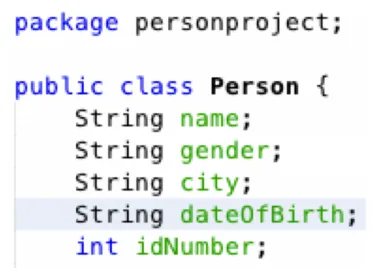
The Person classEach Person object is an instance of the Person class ● These variables are called instance variables [
](https://s11.ax1x.com/2024/02/12/pF8Knu6.png)9.包的引用
packageThe package refers to a group of java classes.
Constructors
Creating a Person Object
Can be used to assign values when an object is created (“constructed”)
类的抽取 抽出共性的特征和行为,保留所关注的部分。
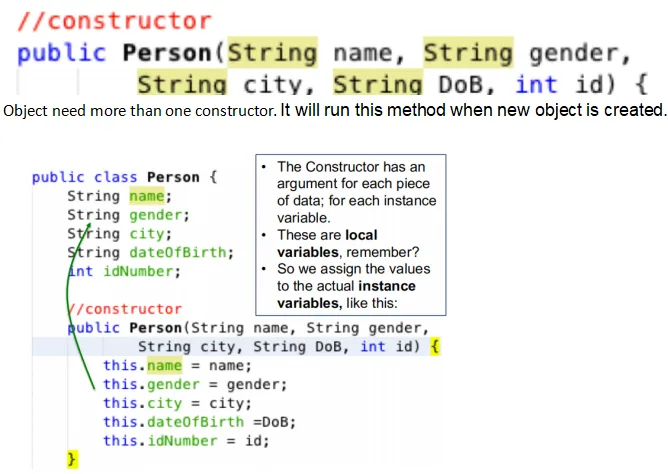
10.Create a constructor
● In our Person class, we created a number of class variables● But we did not give them values
● As they are objects, each one we create can have different variable values
● It is the constructor that allows our initial objects to be different when they are first created!
● This is how we create different people with the same class
[
11.This
传递参数和局部变量的定义Using this.____ refers to this particular object 它可以引用它自己的变量和方法 Can call any of its own methods within the class 或者它自己的任何变量 注意Please use different variable names! 这是一份主方法中的数据
public static void main(String[] args) {Person p1 = new Person("James Bond", "M","London", "1921-11-11", 007);}12.Different classes
Main class has no constructor and has many data object.Other class has a constructor used to construct Person data objects, each with different data. Many different Person data objects will exist.
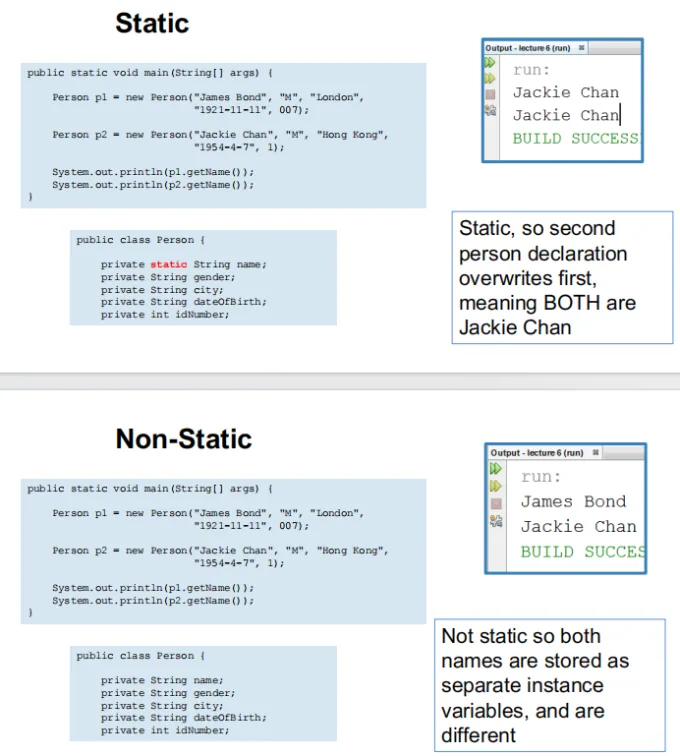
“static or not” keyword static
● Static means that there is only one instance for the entire class
● So even if we create 100 objects, if we use a static variable for person name, then each person will have the same name
● If it is static, each object will overwrite the previous variable
● Can be useful
13.Public and Private
If it is PRIVATE, can only be accessed by that class○ Useful for internal methods
○ something that only needs to be done within the object
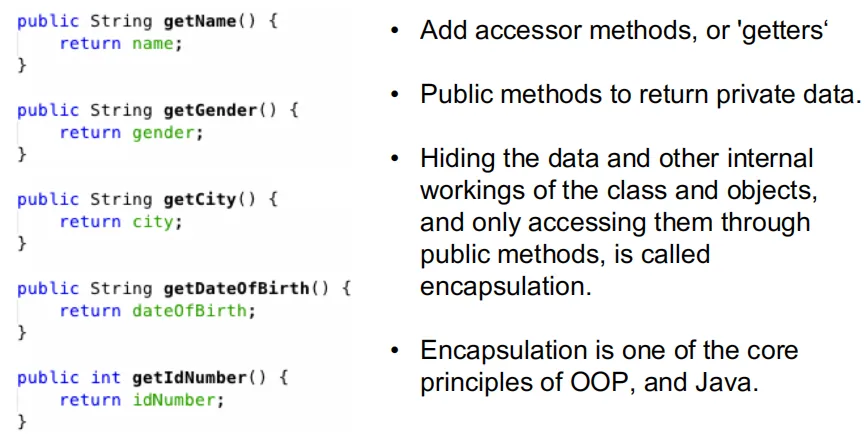
14.Encapsulation
● all attributes should be private● Internal workings should be private
● Object should only share what it needs
● Can use getter methods to access
[
](https://imgse.com/i/pF816FU) [
](https://imgse.com/i/pF81cYF)
不同的对象
15.Primitive variables and Object variables
原始(基本)数据类型只能表示一个简单的值,不能添加、修改和删除属性。引用数据类型可以包含多个键值对,形成复杂的数据结构,可以动态地添加、修改和删除属性。原始(基本)数据类型的值是不可变的,引用数据类型的值是可变的。
原始(基本)数据类型的变量赋值是值的复制,而引用数据类型(对象类型)的变量赋值是引用的复制。 Java传递变量的值的方式,传递变量的复本。 当传递引用数据类型时,实际上是将引用的地址传递给了函数。这意味着函数可以通过引用来访问和修改原始对象。引用是指向存储在内存中的对象的地址,所以传递引用时,传递的是指向对象的指针,而不是对象本身的实际值。
function addTen(num) { // num 是一个局部变量 num += 10; return num;}let count = 20;let result = addTen(count);console.log(count); // 20,没有变化console.log(result); // 30解析如下:
此例展示了在 JavaScript 中传递变量的值的方式。
例中定义了一个函数 addTen,它接受一个参数 num。
在此主要关注变量情况:
首先,定义了一个变量 count,并赋值为 20。
接下来,调用 addTen 函数,并将 count 作为参数传递进去。这里需要注意的是,虽然 count 的值是 20,但是在函数中传递的是 count 的值的副本,而不是 count 本身。 在函数内部,num 的值被增加了 10,变成了 30。然后,函数返回了这个新的值,并将其赋给了变量 result。 最后,通过 console.log 打印了 count 和 result 的值。由于在函数中传递的是 count 的值的副本,所以 count 的值没有发生变化,仍然是 20。而 result 的值是函数返回的新值,即 30。
此处虽然抽象,但是也都是编程的通识。
16.== and .equals()
数字与字符串的不同的等于17. .toString() method
Java中tostring方法的作用是会返回一个【以文本方式表示】此对象的字符串“ 什 么 都 有 ”
Now we have a Person data class. It has:
○ Private data fields – instance variables
○ Constructor
○ Public getter methods
○ It is encapsulated
○ No setter methods
○ It is immutable
○ toString() method to print the object’s values
Combining with Arrays
● Create an array of 3 people:
Person[] people = new Person[3];
● Instantiate our array of people
● Can use our objects we created earlier, or create new ones
people[0] = p1;people[1] = p2;people[2] = new Person("Diana Rigg", "F", "London", "1943-8-21",2);For loops
● Now we can navigate through our array similar to before
● For example, if we want to show everyone’s name
for (int i = 0; i < people.length; i++) {System.out.println("Name is " + people[i].getName());}● Can use toString() method to display all
for (int i = 0; i < people.length; i++) {System.out.println("Name is " + people[i].toString());} [>>返回总目录<<](https://www.fancivoid.asia/technology/xjtlu_cpt111_java-programming-biji/#%E4%BB%A5%E4%B8%8B%E6%98%AF%E6%AF%8F%E8%8A%82%E8%AF%BE%E7%9A%84%E9%93%BE%E6%8E%A5%EF%BC%9A)The Sixth Class
42.Inheritance 继承
Subclass and Superclass超类包含子类
父类与子类 我们可以在父类的实例上调用继承的公共方法
public class Pillar extends Swordsman {}其中Pillar是子类,Swordman是父类
Subclass Constructor and super()
在子分支中重新定义超类方法
43.Final Instance Variable
实例变量final abstract● If the instance variable will never be changed after it is initialized, we can declare it to be final:
public class Pillar extends Swordsman {}public class Pillar extends Swordsman {public Pillar(String name) {super(name); //继承了父类的变量}public static void main(String[] args) {Pillar kyojuro = new Pillar("Kyojuro");}}abstract可以用来修饰类和方法,不能用来修饰属性和构造方法;使用abstract修饰的类是抽象类,需要被继承,使用abstract修饰的方法是抽象方法,需要被子类重写。
final可以用来修饰类、方法和属性,不能修饰构造方法。使用final修饰的类不能被继承,使用final修饰的方法不能被重写,使用final修饰的变量的值不能被修改,所以就成了常量。
To define a constant, we use keywords static final
public class Swordsman {private int healthPoint;public static final int MAX_HP = 100;public Swordsman(String name) {this.name = name;alive = true;numDemonsKilled = 0;numSwordsman++;healthPoint = MAX_HP;}}定义常数
补:W13 lab内容 abstract的用法。
我们要设计一个银行系统,要求有三个类,是一个abstract类的子类。
/** * Bank.java */public abstract class Bank { protected String bankName; protected String bankAddress; public abstract String getBankName(); public String getBankAddress() { return bankAddress; } // Constructor with parameters public Bank(String bankName, String bankAddress) { this.bankName = bankName; this.bankAddress = bankAddress; }}//调整抽象类bank:在bank类中,添加getBankAddress()方法来检索银行地址。/** * BankA.java */public class BankA extends Bank { public BankA(String bankName, String bankAddress) { super(bankName, bankAddress); } @Override public String getBankName() { return bankName; }}//重构BankA类:BankA类现在扩展了Bank并实现了父类的抽象方法。字段bankName和bankAddress从父类继承。/** * Main.java */public class Main { public static void main(String[] args) { BankA A = new BankA("cvcxs", "safafgs"); System.out.println(A.getBankName()); System.out.println(A.getBankAddress()); }}Output:cvcxsSafafgs//将getBankName() getBankAddress()父子类的不同表达想提示abstract的等效地位。父类abstract,子类重构,不同子类也可以用不同的方法。44.@Override Annotation
@Override 是一个 Java 注解(Annotation),它用于表示一个方法(包括构造方法和非静态、非私有的方法)重写(覆盖)了其父类或实现的接口中的方法。@Override注解是伪代码,用于表示被标注的方法是一个重写方法。
只能用于标记方法,并且它只在编译期生效,不会保留在class文件中。
使用@Override注解主要有两个好处:
1)帮助自己检查是否正确的重写父类方法
2)明显的提示看代码的人,这是重写的方法
45.Polymorphism
public class Pillar extends Swordsman {public static void main(String[] args) {Swordsman kyojuro = new Pillar("Kyojuro", 10000, "Fire");System.out.println(kyojuro);}public class Successor extends Swordsman {private String apprenticedTo;public Successor(String name, String apprenticedTo) {super(name);this.apprenticedTo = apprenticedTo;}@Overridepublic String toString() {return "Successor " + getName() + " apprenticed to " + apprenticedTo +" has killed " + getNumDemonsKilled() + " demons";}}public class DemonSlayerCorps {public static void main(String[] args) {Swordsman[] swordsmanTroop = new Swordsman[3];swordsmanTroop[0] = new Swordsman("Tanjiro");swordsmanTroop[1] = new Pillar("Kyojuro", 10000, "Fire");swordsmanTroop[2] = new Successor("Kanao", "Shinobu");for (int i = 0; i < swordsmanTroop.length; i++) {System.out.println(swordsmanTroop[i]);}}}46.E.G
**以下是lab的代码,要求制作一个图书馆书籍分类代码的分为科幻与非科幻,具体细节不限,展现本节课的多态性和子父类。**package com.mycompany.lib;class Book { protected String author; protected String title; protected int numOfBooks; @Override public String toString() { return "Title: " + title + "n" + "Author: " + author + "n" + "Number of books: " + numOfBooks; } public Book(String author, String title, int numOfBooks) { this.author = author; this.title = title; this.numOfBooks = numOfBooks; } public String getAuthor() { return author; } public String getTitle() { return title; } public int getNumOfBooks() { return numOfBooks; } public void setNumOfBooks(int numOfBooks) { this.numOfBooks = numOfBooks; } public void details() { System.out.println("Title: " + title); System.out.println("Author: " + author); System.out.println("Number of books: " + numOfBooks); }}// Fiction subclassclass Fiction extends Book { private final String genre; public Fiction(String author, String title, int numOfBooks, String genre) { super(author, title, numOfBooks); this.genre = genre; } public String getGenre() { return genre; } @Override public void details() { super.details(); System.out.println("Genre: " + genre); } @Override public String toString() { return super.toString() + "n" + "Genre: " + genre; }}// NonFiction subclassclass NonFiction extends Book { private final String topic; public NonFiction(String author, String title, int numOfBooks, String topic) { super(author, title, numOfBooks); this.topic = topic; } public String getTopic() { return topic; } @Override public void details() { super.details(); System.out.println("Topic: " + topic); } @Override public String toString() { return super.toString() + "n" + "Topic: " + topic; }}// Client classpublic class Lib { public static void main(String[] args) { Book[] books = new Book[4]; // Create instances of Fiction and NonFiction books books[0] = new Fiction("Author 1", "Fiction Book 1", 5, "Science Fiction"); books[1] = new Fiction("Author 2", "Fiction Book 2", 3, "Science Fiction"); books[2] = new NonFiction("Author 3", "Non-Fiction Book 1", 2, "History"); books[3] = new NonFiction("Author 4", "Non-Fiction Book 2", 1, "Biology"); for(int i = 0; i < books.length; i++){ System.out.println(books[i]); } // Iterate through the array and display book details }}47.Sixth class Review
1.Encapsulation
在Java中,=操作符用于赋值,而==操作符用于比较
This用于引用实例变量,而不带This的参数则引用构造函数的局部参数。
2.Review: Overloading
● To overload a constructor (method):○ keep the same name
○ change at least one:
■ number of parameters
■ type of parameters
■ order of parameters
● Try yourself: what if you change (only) the return type instead?
● Overloading increases readability of the code
3.Inheritance
Another OOP feature of Java is called inheritanceor subclassing
● Pillar is the subclass or child class that inherits variables and methods from Swordsman, its superclass or parent class
○ enabling code reuse
● We will also overrides a method of Swordsman in Pillar
○ same signature (name + parameters)
4.Overriding
A Pillar only receives half of the damage point reducing their health point@Overridepublic double receiveDamage(double damagePoint) {damagePoint = 0.5 * damagePoint;return super.receiveDamage(damagePoint) ;}5.Polymorphism
Polymorphism ≈ many formsPolymorphism in Java ≈ perform a single action ○ executed in different ways
class Animal { public void sound() { System.out.println("动物发出声音"); }}class Dog extends Animal { @Override public void sound() { System.out.println("狗发出汪汪声"); }}class Cat extends Animal { @Override public void sound() { System.out.println("猫发出喵喵声"); }}public class Main { public static void main(String[] args) { Animal animal1 = new Dog(); // 父类引用指向子类对象 Animal animal2 = new Cat(); // 父类引用指向子类对象 animal1.sound(); // 输出:狗发出汪汪声 animal2.sound(); // 输出:猫发出喵喵声 }}//这就是多态。6.In-Class Quiz 9.7: Polymorphism
public static void main(String[] args) {Swordsman kyojuro = new Pillar("Kyojuro", 1000, "Fire");System.out.println(kyojuro.receiveDamage(10));}95.0 since receiveDamage of Pillar is called
Swordsman类有一个receiveDamage方法,而Pillar类扩展了Swordsman并覆盖了receiveDamage方法,那么即使变量kyojuro被声明为Swordsman,在Pillar类中被覆盖的方法也会在运行时被调用。
7.In-Class Quiz 9.6: Overriding (The reason of 95)
@Overridepublic double receiveDamage(double damagePoint) {damagePoint = 0.5 * damagePoint;return ... ;}48.Protected key word
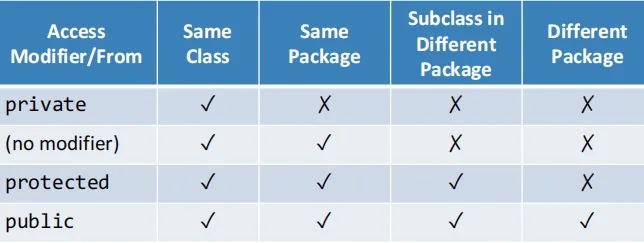
被其修饰的类成员能被所有的类直接访问;It can directly access inherited instance variable from 父类 in 子类 subclass.
1.父类的被protected修饰的类成员包内可见,并且对其子类可见。
2.父类与子类不在同一个包里,子类只可以访问从父类继承的protected成员,不能访问父类实例化的成员。
在Java中有四个访问修改器,可见性按顺序增加:
private → default (no modifier) → protected → public [
49.dynamic type / static type
动态与静态When the Java Virtual Machine calls an instance method, it locates the method of the implicit class based on the dynamic type
○ this form of dynamic polymorphism is called dynamic method selection
public class User {
//静态属性,属于整个类,被整个类的所有对象共享! static int num = 10;
//普通属性,属于某个对象,是对象私有的! private int age=20;
//静态代码块,在类被加载时自动调用,且只会被调用一次。比普通代码块先执行! static {
//无论创建几个User对象,本静态代码块都只会执行一次,num++变成11 System.out.println("这是静态代码块,num="+(num++)); }
//非静态代码块,在对象被创建时自动调用,每次创建对象时都会执行,比构造方法先执行! { //每创建一个User对象,就会执行一次本代码块,num++变成12,age=20. System.out.println("这是非静态代码块,num="+(num++)+",age="+(age++)); }
//构造方法 public User(){ //每创建一个User对象,就会执行一次构造方法,num++变成13,age=21. System.out.println("这是无参构造方法,num="+(num++)+",age="+(age++)); }}------------------------------------------------------------public class UserTest { public static void main(String[] args) { //创建第一个User对象 User user1=new User(); //创建第2个User对象 User user2=new User(); //创建第3个User对象 User user3=new User(); }}------------------------------------------------------------Output:这是静态代码块,num=10这是非静态代码块,num=11,age=20这是无参构造方法,num=12,age=21这是非静态代码块,num=13,age=20这是无参构造方法,num=14,age=21这是非静态代码块,num=15,age=20这是无参构造方法,num=16,age=2150.Exception
[
](https://store.steampowered.com/app/621000/__Exception/) Exception
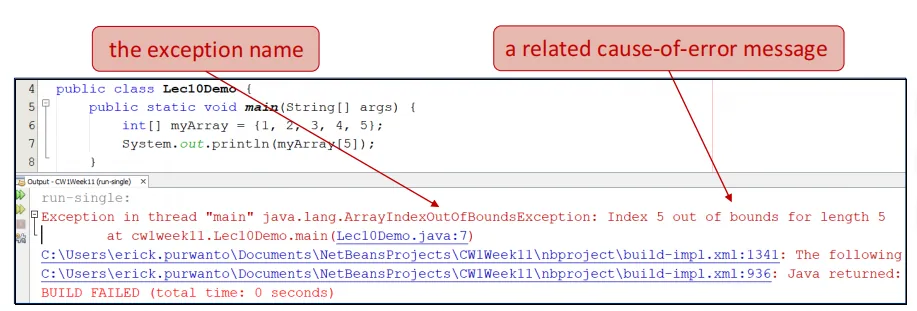
Exception 1:ArrayIndexOutOfBoundsException<
阵列索引超出边界异常We have seen an exception getting thrown before! ○ an ArrayIndexOutOfBoundsException object is thrown during runtime ○ since we are trying to access an invalid array index when we run the program [
Exception 2:Runtime Error
运行时错误When something unexpected happens while the program is running, JVM throws an exception object ○ instead of returning a special value, such as -1 when String method indexOf does not find the search value E.g.
Scanner sc = new Scanner(System.in);int n = Integer.parseInt(sc.nextLine()); Entering a zeroSystem.out.println(1/n);Exception 3:Throwing exception object
We can throw an exception object in our function (static method) ormethod (instance method) whenever something unexpected happens 例如,创建整数除法函数,只要除数为零时,它就会抛出一个算术异常对象。
Catching an exception object 1
try和catch是用于处理异常的语句,它们构成了一种异常处理机制。Try捕获,catch处理。
try block后必须接catch block(try后必须接catch、finally或资源声明)
try block : put the risky method call here, and what to do next if execution turns out to be normal
将可能异常的部分放于try块里执行。
if an exception is thrown anywhere in try block, the program execution jumps to catch block.
Try块执行错误,跳转到catch block
代码示例如下:
public class Exception {public static int myIntDiv(int a, int b) {/*if (b == 0)*throw new ArithmeticException("Cannot divide by zero!");*else*/return a / b;}public static void main(String[] args) {Scanner sc = new Scanner(System.in);int n = Integer.parseInt(sc.nextLine());try {System.out.println(myIntDiv(1, n));}catch (ArithmeticException e) {System.out.println("You entered a zero!");}/**catch (ArithmeticException e) {*System.out.println(e.getMessage());*}*如果想输出Cannot divide by zero!用此catch block注意throw和getMessage对应用法 throw new xx(“aa”) yy.getMessage()*/}}Input:0Output:You entered a zero!The Seventh Class
File I/O and GUI with JavaFX
目标:I/O学习Java文件
I/O机制写入和读取一个文件
本节对于CW3非常重要
51.creating, writing to and reading from a file
(不知道什么是CW3见[>>前言<<](https://www.fancivoid.asia/technology/xjtlu_cpt111_java-programming-biji)) **Data**Data stored in a variable will be lost when a program terminates.
变量只能用来临时存储Data,所以要专门位置的专门文件来储存Data。
Absolute file name
绝对文件名取决于操作系统-
For example in Windows:
C
Relative file name
相对文件名
relative to the current working directory
For example in Windows:
datatext1.txt
由于操作系统可能有所不同,在创建文件对象时不要使用绝对文件名 使用Java中的相对文件名 File file= new File(“data/text1.txt”);创建文件对象实际上并不会在计算机上创建文件。
52.File Methods
1.file.exists():
[>>1-3的解析<<](https://www.php.cn/faq/582940.html)This method returns a boolean indicating whether the file or directory denoted by this abstract pathname exists.
It returns true if the file or directory exists;
otherwise, it returns false.
2.file.isFile():
This method tests whether the file denoted by this abstract pathname is a normal file.It returns true if it is, false otherwise.
Sure, let’s go through each of these File methods and their usage< >
3.file.isDirectory():
This method tests whether the file denoted by this abstract pathname is a directory.It returns true if it is, false otherwise.
boolean isDirectory = file.isDirectory();
4.file.isHidden():
This method tests whether the file or directory denoted by this abstract pathname is hidden.It returns true if the file or directory is hidden,
false otherwise. boolean isHidden = file.isHidden();
5.file.length():
This method returns the length of the file denoted by this abstract pathname.For directories, it returns 0.
long length = file.length();
6.file.canRead():
This method tests whether the application can read the file denoted by this abstract pathname.It returns true if the file can be read,
false otherwise. boolean canRead = file.canRead();
7.file.canWrite():
This method tests whether the application can modify the file denoted by this abstract pathname.It returns true if the file can be modified,
false otherwise. boolean canWrite = file.canWrite();
8.file.getAbsolutePath():
This method returns the absolute pathname string of this abstract pathname.String absolutePath = file.getAbsolutePath();
现在,对于要重命名和删除的操作:
9.file.delete():
This method deletes the file or directory denoted by this abstract pathname. It returns true if the file or directory is successfully deleted, false otherwise.boolean deleted = file.delete();
10.file.renameTo(File dest):
This method renames the file denoted by this abstract pathname. It returns true if the file is successfully renamed,false otherwise. The dest parameter is the new abstract pathname for the named file. File newFile = new File(“data/text2.txt”);
boolean renamed = file.renameTo(newFile);
11.file.mkdir():
This method creates the directory named by this abstract pathname. It returns true if the directory is successfully created, false otherwise.boolean directoryCreated = file.mkdir();
Tip:renameTo方法通常用于通过在File参数中指定不同的路径来将文件移动到不同的目录中。如果目标文件已经存在,那么它将会被替换。
53.Creating a new file using PrintWriter
File newFile = new File("data/text2.txt");//在这一行中,创建了一个名为 newFile 的 File 对象,表示文件系统中的路径为 "data/text2.txt" 的文件。如上文所述这行代码并不会在文件系统中创建文件,只是在内存中创建了一个文件对象。if (newFile.exists()) {System.out.println("File already exists!");System.exit(0);}//if (newFile.exists()) { System.out.println("File already exists!"); System.exit(0); }:这是一个条件语句。exists() 方法检查文件是否已经存在。如果文件已经存在,会输出一条消息 "File already exists!" 并终止程序(System.exit(0) 用于退出程序,参数 0 表示正常退出)。try {PrintWriter output = new PrintWriter(newFile);}//这是一个异常处理块。在 try 块中,创建了一个 PrintWriter 对象,用于写入数据到文件。如果文件不存在(根据前面的检查),则会创建新文件。请注意,这里的 printWriter 可以用于写入文本数据。catch (IOException ioe) {System.out.println(ioe.getMessage());}//如果在创建 PrintWriter 对象时发生 IOException 异常,将进入 catch 块。在这里,只是简单地打印异常消息到控制台。通常,更复杂的应用程序会包含更详细的错误处理逻辑。54.PrintWriter
File file = new File("data/text1.txt");try {PrintWriter output = new PrintWriter(file); //假设文件存在output.println("Tanjiro");output.println("Zenitsu");output.println("Inosuke"); //等同于System.out.printlnoutput.close(); //必须使用close()方法来写入数据和关闭文件} catch (IOException ioe) {System.out.println(ioe.getMessage());}//要创建文件data/text1.txt,您需要首先创建文件夹数据import java.io.File;import java.io.IOException;import java.io.PrintWriter;public class WriteToFileExample { public static void main(String[] args) { File file = new File("data/text1.txt"); file.getParentFile().mkdirs(); try { PrintWriter output = new PrintWriter(file); output.println("Tanjiro"); output.println("Zenitsu"); output.println("Inosuke"); output.close(); System.out.println("Data has been written to the file successfully."); } catch (IOException ioe) { System.out.println("An error occurred: " + ioe.getMessage()); } }}55.In-Class Quiz 10.1
反复运行上述写入数据的程序,它会再次创建 "data/text1.txt" 文件并向其中写入相同的三行数据。每次运行程序时,它都会重新创建该文件并覆盖之前的内容,因此文件中将仍然只包含这三行数据,并不会累加新的数据。
56.BufferedWriter
**缓冲器**try {FileWriter file = new FileWriter("data/text1.txt");BufferedWriter buffer = new BufferedWriter(file);buffer.write("Tanjiro");buffer.newLine();buffer.write("Zenitsu");buffer.newLine();buffer.flush();buffer.write("Inosuke");buffer.newLine();buffer.close();} catch (IOException ioe) {System.out.println(ioe.getMessage());}总的来说,write方法将数据写入已缓冲区,flush方法用于将已缓冲的数据刷新到文件中,确保数据被写入。
newLine方法用于插入平台无关的换行符。这些步骤有助于确保数据准确地写入到文件中,并保持良好的文件内容格式。
57.Using Scanner
File file = new File("data/text1.txt");try {Scanner input = new Scanner(file);while (input.hasNextLine()) {String name = input.nextLine();Swordsman swordsman = new Swordsman(name);System.out.println(swordsman);}input.close();} catch (IOException ioe) {System.out.println(ioe.getMessage());}58.Reading csv data using Scanner
csv (comma-separated values) file关于CSV文件的数据格式,每行的数据由逗号分隔,第一个值是角色名字,第二个值是击败的妖魔数量。示例CSV文件是:
Tanjiro,10
Zenitsu,5
Inosuke,8
File file = new File("data/demonslayerdata.csv");try {Scanner input = new Scanner(file);while (input.hasNextLine()) {//while循环,它会一行一行地读取文件,直到文件的末尾。String line = input.nextLine();//读取当前行的文本内容。String[] values = line.split(",");//使用逗号作为分隔符,将当前行的文本内容分割成一个字符串数组。 就是,前算一个字符串的数组元素String name = values[0];//从数组中取得第一个元素,即角色的名字。int numDemonsKilled = Integer.parseInt(values[1]);//从数组中取得第二个元素,将其解析为整数,表示该角色击败的妖魔数量。Swordsman swordsman = new Swordsman(name, numDemonsKilled);//创建一个Swordsman对象,将从文件中读取的数据传递给构造函数。System.out.println(swordsman);//打印输出当前读取的Swordsman。}input.close();} catch (IOException ioe) {System.out.println(ioe.getMessage());} **下一节是同节课的JavaFX介绍,是CW3的主要部分。**The Eighth class
Overview
List, Set, Map 集合
这是CW3的关键部分。
60.List
List的特性:有序、可重复。我们将学习关于列表
○如何创建一个列表
○如何添加和访问它的数据
○如何插入和删除它的数据
○如何使用它来解决问题
●要创建列表,请在菱形<>操作符中指定对象/泛型类型:
List list1 = new ArrayList();List list2 = new LinkedList();List list = new ArrayList<>();list.add("A");list.add("B");list.add("C");list.add(1, "X");list.set(2, "Y");System.out.println(list);Output[A X Y C]Set将第三位的变为x
Add添加x到第a位,a位开始的往后移。
○ adding 加
list.add(5)
○ inserting 插入
list.add(1, 3)
○ assigning 分配
list.set(2, 7)
○ retrieving 检索第几位的数据
list.get(2)
○ length List数据总长度 int
list.size()
○ remove 移除第几位
list.remove(1)
○ remove all 清除全部
list.clear()
○ Create a list from an array 创建
List list = Arrays.asList(10, 20, 30)List is an interface
ArrayList vs LinkedList 1
总结:
ArrayList Resizing Array
优势:频繁访问,
linkedList Doubly Linked List
优势:频繁插入清除。
打印数据
public class List { public static void main(String[] args) { List list = Arrays.asList(10, 20, 30); for (int x : list) { System.out.print(x + " ");}}}Output:10 20 3061.Set
Set接口是一个无序、不可重复的集合Set接口有几个常见的实现类: 1. HashSet – implemented using a hash table 2. TreeSet – implemented using a self-balancing tree data structure
Set set = new HashSet<>();Set set = new TreeSet<>();○ adding 单纯导入5
set.add(5)
○ checking membership 检查是否包含5 输出boolean
set.contains(5)
○ remove 移除5
set.remove(5)
○ union 将集合c中所有元素加到set中
set.addAll(c)
○ intersection 保留set和c的交集
set.retainAll(c)
○ difference 移除set和c的交集
set.removeAll(c)
○ contain/subset 检查set是否是c的子集
set.containsAll(c)
○ size set元素的个数
set.size()
○ clear contents 清除set
set.clear()
62.Map
通过查看Map接口描述,看到Map有多个子类,这里我们主要讲解常用的HashMap集合、LinkedHashMap集合。
HashMap:存储数据采用的哈希表结构,元素的存取顺序不能保证一致。由于要保证键的唯一、不重复,需要重写键的hashCode()方法、equals()方法。
LinkedHashMap:HashMap下有个子类LinkedHashMap,存储数据采用的哈希表结构+链表结构。通过链表结构可以保证元素的存取顺序一致;通过哈希表结构可以保证的键的唯一、不重复,需要重写键的hashCode()方法、equals()方法。TreeMap:TreeMap集合和Map相比没有特有的功能,底层的数据结构是红黑树;可以对元素的键进行排序,排序方式有两种<自然排序和比较器排序> 一般会有对应关系,所以叫key/value pairs
○ map.put(key, val)
adding the mapping key → val 添加映射键→val
○ map.get(key)
get the value for a key 获取一个键的值
○ map.containsKey(key)
test whether the map has the key 测试该地图是否具有该密钥
○ map.containsValue(value)
test whether the map has the value 测试该映射是否具有该值
○ map.remove(key)
delete a mapping 删除映射
○ map.keySet() 返回一个包含所有键的集合
Swordsman tanjiro = new Swordsman("Tanjiro", 5);Swordsman zenitsu = new Swordsman("Zenitsu", 2);Swordsman inosuke = new Swordsman("Inosuke", 10);Map troops = new HashMap<>();troops.put("Tanjiro", tanjiro);troops.put("Zenitsu", zenitsu);troops.put("Inosuke", inosuke);Swordsman swordsman = troops.get("Kyojuro");System.out.println(swordsman);输出null因为没有该映射
[>>返回总目录<<](https://www.fancivoid.asia/technology/xjtlu_cpt111_java-programming-biji/#%E4%BB%A5%E4%B8%8B%E6%98%AF%E6%AF%8F%E8%8A%82%E8%AF%BE%E7%9A%84%E9%93%BE%E6%8E%A5%EF%BC%9A)The Ninth&Tenth class
The ninth class 63
The tenth class 64 Protection, Ethics and Professional issues 数据保护、道德及专业问题
63.Recursion
递归 一般会考一道大题Algorithms Design Techniques
没什么知识点,这里用大量题目显示递归的作用。
核心是:用方法,执行一次实现一次循环。
public static long fact(int n) {if (n == 0)return 1;elsereturn fact(n-1) * n;}课程里有提问:斐波那契数列的递归实现
public class Fibonacci { public static int fibonacci(int n) { if (n <= 1) { return n; } else { return fibonacci(n - 1) + fibonacci(n - 2); } } public static void main(String[] args) { Scanner n = new Scanner(System.in); String next = n.nextLine(); int num=Integer.parseInt(next); System.out.print(fibonacci(num)+"n"); }}**字符串拼接
Ex12.1**
Complete the method numXY.
It finds the number of times the string “XY” appears in the input string recursively.
You must not use any loops or regular expressions.
For example:
| Test | Result |
|---|---|
| System.out.println(numXY(“AAXYAA”)); | 1 |
| System.out.println(numXY(“AXYBXYAA”)); | 2 |
代替loop的作用
public class XYCounter { public static void main(String[] args) { System.out.println(numXY("AAXYAA"));System.out.println(numXY("AXYBXYAA")); }public static int numXY(String input) { if (input.length() < 2) { return 0; } else if (input.startsWith("XY")) { return 1 + numXY(input.substring(2)); } else { return numXY(input.substring(1)); }}}Ex12.2
Complete the method remDup.It reduces all adjacent same characters that appear in the input string to a single character recursively.
You must not use any loops or regular expressions.
For example:
| Test | Result |
|---|---|
| System.out.println(remDup(“hello”)); | helo |
| System.out.println(remDup(“abbbcd”)); | abcd |
public class StringManipulator { public static void main(String[] args) { // Test cases System.out.println(remDup("hello")); // Output: helo System.out.println(remDup("abbbcd")); // Output: abcd }public static String remDup(String input) { if (input.length() <= 1) { return input; } else if (input.charAt(0) == input.charAt(1)) {// If the current character is the same as the next one, skip the current character return remDup(input.substring(1)); } else {// If the current character is different from the next one, keep the current character return input.charAt(0) + remDup(input.substring(1)); }}Review charAt&substring
23/24期末考试问题:输入一个字符串,请你写一个递归,检验字符串是否都是大写字母。
字符串问题就一定要用到charAt&substring以及string.equals这类的判断。 charAt(0)
str.charAt(0)检索str中的第一个字符str.charAt(n)检索str中的第n-1个字符 subString常用方法一:
String a = “123456anbdc”;
String b = a.subString(1);
此时得到的为字符串a从下标为1的位置开始截取到最后的值,也就是23456anbdc; subString常用方法二:
String a = “123456anbdc”;
String b = a.subString(1,5);
此时得到的为字符串a从下标为1的位置开始截取到下标为5的位置的值(不包括下标为5的值),也就是2345;
Ex12.3
**与12.2几乎完全相同**Complete the method sepStar.
It separates all identical adjacent characters that appear in the input string from each other by ”*” recursively.
You must not use any loops or regular expressions.
| Test | Result |
|---|---|
| System.out.println(remDup(“hello”)); | hel*lo |
| System.out.println(sepStar(“uuvxxyzzz”)); | uuvxxyzzz |
public class EX123 {public static void main(String[] args) { // Test cases System.out.println(sepStar("hello")); // Output: hel*lo System.out.println(sepStar("uuvxxyzzz")); // Output:u*uvx*xyz*z*z }public static String sepStar(String input) { if (input.length() <= 1) { return input; } else if (input.charAt(0) == input.charAt(1)) {// If the current character is the same as the next one, skip the current character return input.charAt(0)+"*"+sepStar(input.substring(1)); } else {// If the current character is different from the next one, keep the current character return input.charAt(0) + sepStar(input.substring(1)); }}}EX12.4 2019 Final Exam
Complete the helper method smallest.It finds the smallest integer in an integer array recursively. You may assume that input array has at least one element in it You must not use any loops or regular expressions. Test cases: smallest([10, 5, 7, 9]) → 5 For example:
| Test | Result |
|---|---|
| int[] arr1 = {10, 5, 7, 9}; System.out.println(smallest(arr1)); | 5 |
// Exercise #12.4 Recursive Smallest Integerpublic class EX124 {public static void main(String[] args) { int[] arr1 = {10, 5, 7, 9};System.out.println(smallest(arr1)); }// Appear in FINAL EXAM 2019 public static int smallest(int[] array) { return smallest(array, 0); } private static int smallest(int[] array, int start) {// Base case: If there's only one element left in the array, return that element if (start == array.length - 1) { return array[start]; }// Recursive step: Find the smallest element in the rest of the array int smallestRest = smallest(array, start + 1);// Compare the smallest element in the rest with the current element if (array[start] < smallestRest) {// If the current element is smaller, return it return array[start]; } else {// If the smallest in the rest is smaller, return that return smallestRest; }}}CW12
Complete the helper method replaceOddZeroHelper.It replaces all odd numbers with zero in the input integer list recursively. You must not use any loops or regular expressions. The imported libraries are Arrays and List. For example:
| Test | Result |
|---|---|
| List list = Arrays.asList(1, 2, 3, 4, 5); replaceOddZero(list); System.out.println(list); | 0, 2, 0, 4, 0 |
// CW1 12.1 Recursive Replace Odd with Zeropublic class cw12{public static void main(String[] args) {List list = Arrays.asList(1, 2, 3, 4, 5);replaceOddZero(list);System.out.println(list);}public static void replaceOddZero(List list) { replaceOddZeroHelper(list, 0);}private static void replaceOddZeroHelper(List list, int start) { // Base case if (start>=list.size()){ return; } if (list.get(start) % 2 != 0){ list.set(start,0); } replaceOddZeroHelper(list,start+1); // Recursive step}这里都用了一个List+一个int来处理,一个负责改变输出,一个负责记录位置。
64.Data Protection, Ethics and Professional issues
能进行一些常识判断即可提示一下:非常识知识点
一般只考一题选择。
>>这里是课件<<
Mid-Review
Overview:
对象和类,面向对象思维,多态与继承
41.Review:
鬼灭之刃主题教学Instance Variable实例变量
A swordsman has a name 记录鬼灭剑客的各项数据○ we also want to keep track whether they are alive,
and the number of demons they have killed
public class Swordsman {private String name;private boolean alive;private int numDemonsKilled;...}Constructor 构造器
接上...的内容Error example
public Swordsman(String n) {String name = n;boolean alive = true;int numDemonsKilled = 0;}Right example
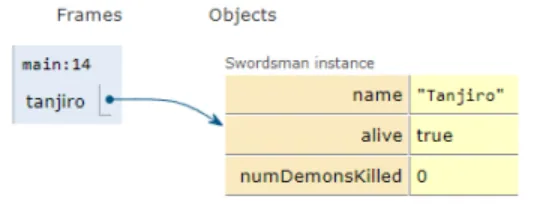
public Swordsman(String name) {this.name = name;alive = true;numDemonsKilled = 0;}Test Client, Object Instantiation 测试客户端,对象实例化
接上...的内容public static void main(String[] args) {Swordsman tanjiro = new Swordsman("Tanjiro");}Reference Type 引用类型
[
Private 私有变量
接上...的内容By setting the instance variables to be private, client classes
实例变量设置为私有的
其他方法 cannot directly access or change their values
Compile error
public class Swordsman {private String name;...}public class DemonSlayerCorps {...public static void main(String[] args) {Swordsman tanjiro = new Swordsman("Tanjiro");tanjiro.name = "Inosuke";}}ToString() Method
toString() is a method that returns string representation of this object.○ it enables an object to be printed 是一种返回此对象的字符串表示形式的方法,字面意思。
public class Swordsman {...public String toString() {String alive;if (this.alive) alive = "alive";elsealive = "dead";return "Swordsman " + name + " is " + alive +" and has killed " + numDemonsKilled + " demons";}automatically calls
tanjiro.toString()
Getter and Setter
**get+object() 区别是get取得了一个值,set+object() set构建了一个值**public class Swordsman {private String name;...public String getName() {return name;}public void setName(String newName) {name = newName;}...}Instance Method
Instance method performs operation on instance variables of the instance.○ Instance method is called on an object
用法:实例对象.实例方法
public class Swordsman {private int numDemonsKilled;...public void killsDemon() {numDemonsKilled++;}public static void main(String[] args) {Swordsman tanjiro = new Swordsman("Tanjiro");tanjiro.killsDemon();System.out.println(tanjiro);}}Method Overloading
Method overloading: same name, different signature○ same method name, different parameter numbers or types
一个方法名字不同的参数编号或类型
public class Swordsman {private int numDemonsKilled;...public void killsDemon() {numDemonsKilled++;}public void killsDemon(int demonsKilled) {numDemonsKilled += demonsKilled;}...}Constructors Overloading
same name, different signature○ we can call other constructors by using this()
一个构造函数也可以被多次重载(overload)为同样名字的函数
public class Swordsman {public Swordsman(String name) {this.name = name;alive = true;numDemonsKilled = 0;}public Swordsman(String name, int numDemonsKilled) {this(name);this.numDemonsKilled = numDemonsKilled;}public Swordsman() {this("Nameless");}}Static Method / Function
Just like instance methods, it can access and modify instance variables○ however, a static method is not necessarily called on an object
public static boolean sameNumDemonsKilled(Swordsman s1, Swordsman s2) {return s1.numDemonsKilled == s2.numDemonsKilled;}public static void main(String[] args) {Swordsman tanjiro = new Swordsman("Tanjiro");tanjiro.killsDemon();Swordsman zenitsu = new Swordsman("Zenitsu", 1);boolean sameKills = sameNumDemonsKilled(tanjiro, zenitsu);System.out.println(sameKills);}Class Variable / Static Variable
public class Swordsman {private String name;private boolean alive;private int numDemonsKilled;private static int numSwordsman = 0;public Swordsman(String name) {this.name = name;alive = true;numDemonsKilled = 0;numSwordsman++;}}Accessing Class Variable
To access a class variable, we can use both static or instance methodspublic class Swordsman {public static int getNumSwordsman() {return numSwordsman;}public int getNumSwordsmanInst() {return numSwordsman;}public static void main(String[] args) {...System.out.println(getNumSwordsman());System.out.println(tanjiro.getNumSwordsmanInst());}}Array of Objects
Just like int or String, we can create an array of Swordsman objects可以为对象创建数组
public class DemonSlayerCorps {public static void main(String[] args) {Swordsman[] swordsmanTroop = new Swordsman[2];swordsmanTroop[0] = new Swordsman("Tanjiro");swordsmanTroop[1] = new Swordsman("Zenitsu", 1);for (int i = 0; i < swordsmanTroop.length; i++) {System.out.println(swordsmanTroop[i]);}}} **经过这轮复习,你掌握了吗?**Overriding&Overloading&Overflowing的区别
覆盖和重载、和溢出重载(overloading)是指在同一类中定义多个同名但参数类型或数量不同的方法,以实现不同的功能。在编译时根据传递的参数类型和数量确定调用哪个方法。重载方法必须具有不同的参数列表。重载通常用于提供多种不同的方法签名,以方便程序员使用。
public class MathUtils { public int add(int x, int y) { return x + y; } public double add(double x, double y) { return x + y; }}覆盖(overriding)是指在子类中定义与父类中同名、参数类型和数量相同的方法,以覆盖父类中的方法。覆盖方法必须具有相同的方法签名(即方法名称、参数类型和返回类型)。覆盖方法通常用于实现多态性(polymorphism),即同一个方法调用可以在不同的对象上产生不同的行为。
public class Animal { public void speak() { System.out.println("I am an animal."); }}public class Cat extends Animal { @Override public void speak() { System.out.println("Meow!"); }}溢出(overflowing)是指计算或操作时结果超出了数据类型的表示范围而发生数字溢出的现象。当进行数值运算时,如果结果超出了数据类型所能表示的最大值或最小值,就会发生溢出。
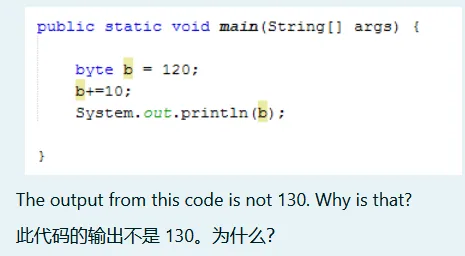
int a = 2_000_000_000;int b = 2_000_000_000;int sum = a + b;System.out.println(sum); // 输出为 -294967296在这个例子中,尽管 a 和 b 都是 int 类型并且看起来是正常的整数,但是由于它们的总和超出了 int 类型的最大值,因此发生了溢出。结果 -294967296 并不是正确的数值。 [
JavaFX
封面 illusion by 梅原せい
59.GUI with JavaFX
Previously, Java GUI classes are Abstract Windows Toolkit (AWT) and Swing○ Depreciated, no longer updated
● JavaFX is the new framework that replaces them since Java 8
注意这里提供的JavaFX版本是61版本,对应的是JDK17。
JavaFX根本就没有流行过,现在JavaFX已经被Java SE 9及更高版本所取代,其组件已经加入公共库。所以并不需要过于深入的学习。
1.JavaFX Advantages
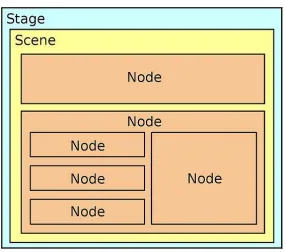
Stage: top level container to be displayed 显示的顶层容器Scene: Scene objects are placed in a Stage object
场景对象被放置在一个舞台对象中
Node: Node objects are placed in a Scene object
节点对象被放置在一个场景对象中
■ Node objects are visual components such as buttons, images, panes, and shapes 节点对象是视觉组件
■ Node can contain other nodes
节点可以包含其他节点 [
2.Say hello to the GUI world
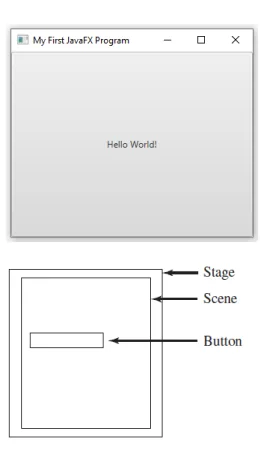
import javafx.application.Application;import javafx.stage.Stage;import javafx.scene.Scene;import javafx.scene.control.Button;public class JavaFXTesting extends Application {@Overridepublic void start(Stage primaryStage) {Button helloButton = new Button("Hello World!");Scene scene = new Scene(helloButton, 200, 250);primaryStage.setTitle("My First JavaFX Program");primaryStage.setScene(scene);primaryStage.show();}public static void main(String[] args) {launch(args);}} 1.方法一定包含于extends Application2.方法用于放置node对象
比如此处将Button放入Scene中
3.当然stage对象中显示scene对象
4.Scene对象按Scene(node,width,height)创建
构造函数指定宽度、高度和在场景中放置节点
5.一个stage对象是一个窗口
当应用程序启动时,JVM会自动创建一个称为primary object的阶段对象。
将nodes放置在Pane 中,以设置场景中的the location和the size。
[
3.Button in a Pane
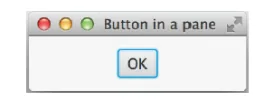
package fxtest;import javafx.application.Application;import javafx.scene.Scene;import javafx.scene.control.Button;import javafx.stage.Stage;import javafx.scene.layout.StackPane;public class FXtest extends Application { @Override public void start(Stage primaryStage) { // Create a scene and place a button in the scene StackPane pane = new StackPane();pane.getChildren().add(new Button("OK"));//这两步简化为StackPane pane = new StackPane(new Button("OK")); Scene scene= new Scene(pane, 200, 50); primaryStage.setTitle("Button in a pane"); // Set the stage titlel primaryStage.setScene(scene); // Place the scene in the stage primaryStage.show(); // Display the stage } public static void main(String[] args){ launch(args); }}[
4.Circle
Circle is displayed in the center of scene, but not after window is resized.初始界面处于中心,调整后不处于。package circlefx;import javafx.application.Application;import javafx.scene.Scene;import javafx.scene.layout.Pane;import javafx.stage.Stage;import javafx.scene.paint.Color;import javafx.scene.shape.Circle;public class CircleFX extends Application { public void start(Stage primaryStage) {//Create a circle and set its properties Circle circle = new Circle(); circle.setCenterX(150); circle.setCenterY(150); circle.setRadius(50); circle.setStroke(Color.BLACK); circle.setFill(Color.WHITE);//显而易见的位置XYJava Coordinate System(以左上为原点)黑边白填充//Create a pane to hold the circle Pane pane =new Pane(); pane.getChildren().add(circle);//create a scene and place it in the stage Scene scene =new Scene(pane,300,300); primaryStage.setTitle("Showcircle"); primaryStage.setScene(scene); primaryStage.show(); } public static void main(String[] args) { launch(args); }}当然,就会想到如果能把Circle绑定在窗口中心就好了。
import javafx.application.Application;import javafx.scene.Scene;import javafx.scene.layout.Pane;import javafx.stage.Stage;import javafx.scene.paint.Color;import javafx.scene.shape.Circle;public class CircleFX extends Application { public void start(Stage primaryStage) { //Create a pane to hold the circle Pane pane =new Pane(); //Create a circle and set its properties Circle circle = new Circle(); circle.centerXProperty().bind(pane.widthProperty().divide(2)); circle.centerYProperty().bind(pane.widthProperty().divide(2));[1] circle.setRadius(50); circle.setStroke(Color.BLACK); circle.setFill(Color.WHITE); pane.getChildren().add(circle);[2] //create a scene and place it in the stage Scene scene =new Scene(pane,300,300); primaryStage.setTitle("Showcircle"); primaryStage.setScene(scene); primaryStage.show(); } public static void main(String[] args) { launch(args); }}对pane操作的理解: [1]这些线使用属性绑定来确保圆的中心始终是窗格宽度的一半。这意味着,如果窗格的宽度改变,圆的中心将自动相应地调整。 [2]将“圆”节点添加到窗格的子节点,使其成为窗格图形内容的一部分。
[

5.Color
setFill和setstroke用color代码当然也包含了RGB的输入 Use RGBA (red, green, blue, alpha/opacity) model 自定义创建 ○ values are from 0.0 (darkest) to 1.0 (lightest) ○ example: C
Color color = new Color(0.78, 0.14, 0.333, 0.51);circle.setStroke(color);circle.setFill(color);特别的,Color.TRANSPARENT=透明。
6.Font, Label and StackPane
Label label = new Label("JavaFX");label.setFont(Font.font("Times New Roman",FontWeight.BOLD, FontPosture.ITALIC, 20));//字体种类、粗细、字体姿势、大小pane.getChildren().add(label);Label = new Label("JavaFX");7.Image and ImageView
//Create a pane to hold the image viewsPane pane = new HBox(10);//盒子,其中子元素间隔为10pane.setPadding(new Insets(5, 5, 5, 5));//pane 的内边距(padding),分别是上下左右Image image = new Image("image/us.gif");//导入图片pane.getChildren().add(new ImageView(image));setFitweightsetFitHeight//变换宽长setRotate(90)//旋转(顺时针90度)8.Layout Panes
JavaFX provides many types of panes for organizing nodesClass JavaFX为组织节点提供了多种类型的窗格。
Description
Pane
Base class for layout panes. It contains the getChildren() method for returning a list of nodes in the pane.
Pane 是所有布局窗格的基类。它本身没有特定的布局策略,但提供了一个容器,可以通过 getChildren()
方法获取其子节点列表。你可以使用它作为其他布局的基础。
StackPane
Places the nodes on top of each other in the center of the pane.
StackPane 将其子节点堆叠在一起,居中显示。后添加的节点将覆盖先添加的节点,因此最后添加的节点将显示在最上面。
FlowPane
Places the nodes row-by-row horizontally or column-by-column vertically. FlowPane 将其子节点按行或列的方式排列。它会自动换行,根据需要创建新行或列,以适应容器的大小。
GridPane
Places the nodes in the cells in a two-dimensional grid.
GridPane 将子节点放置在二维网格中,可以通过指定行和列来控制子节点的位置。这是一个强大的布局,适用于复杂的 UI 布局。
BorderPane
Places the nodes in the top, right, bottom, left, and center regions.
BorderPane 将其子节点放置在顶部、右侧、底部、左侧和中心的不同区域。通常用于创建简单的页面布局,例如典型的主页面结构。
HBox
Places the nodes in a single row.
将节点放在一行中。
VBox
Places the nodes in a single column.
将节点放在单个列中。
9.Shapes
● Shapes are nodes used for drawingtexts, lines, circles, rectangles, ellipses, arcs, polygons, and polylines; with properties:
○ fill: a color fills the interior of a shape
○ stroke: a color used to draw the outline of a shape
○ strokeWidth: width of outline of a shape
10.Text
(x,y)=(10,100)Text text3 = new Text(10, 100, "Programming is funnDisplay text");text3.setFil1(Color.RED);//红色text3.setUnderline(true);下划线text3.setStrikethrough(true);删除线pane.getChildren().add(text3);//在cw3的文字绑定窗口的操作中,并没有使用Text而是label。11.Line
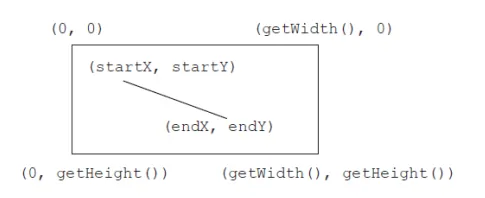
绑定窗口操作Line(startX,startY,endX,endY)
[
12.Rectangle
//Create rectanglesRectangle r1 = new Rectangle(25, 10, 60,30);r1.setFill (Color.WHITE);r1.setStroke(Color.BLACK);Rectangle r2 = new Rectangle(25, 50, 60, 30);Rectangle r3 = new Rectangle(25, 90, 60,30);r3.setArcWidth(15);r3.setArcHeight (25);// Create a group and add nodes to the groupGroup group = new Group();group.getChildren().addA11(new Text(10, 27, "r1"), r1,new Text(10, 67, "r2"), r2, new Text(10, 107, "r3"), r3);for (int i= 0; i<4; i++) {Rectangle r = new Rectangle(100, 50, 100, 30);r.setRotate(i * 360 / 8);r.setStroke(Color.color(Math.random(), Math.random(),Math.random()));r.setFil1 (Color.WHITE);group.getChildren().add(r);}13.Ellipse
Ellipse(centerX,centerY,radiusX,radiusY)[
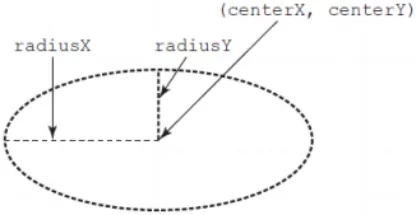
14.Arc
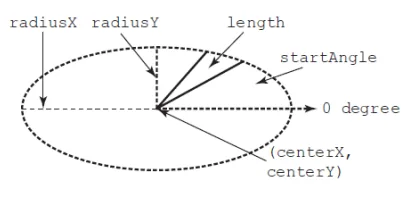
[
](https://imgse.com/i/pFJDOw8)
Arc(centerX,centerY,radiusX,radiusY,startAngle,length)
[
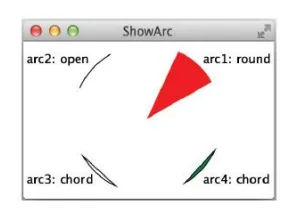
](https://imgse.com/i/pFJDXTS) Arc.setType
15.Polygon and Polyline
**多边形多段线 实际上是List计算和for循环的组合**[
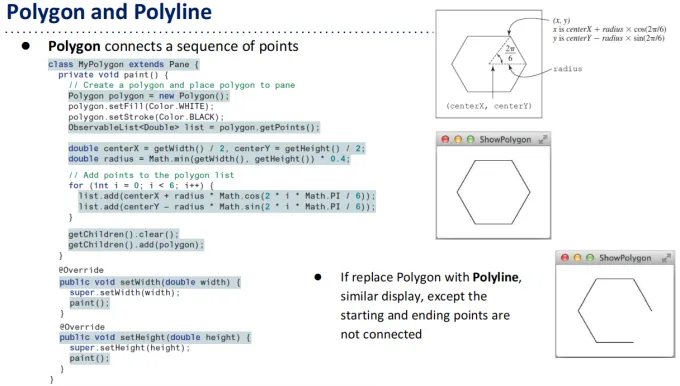
16.Lab
Task1
制作一个椭圆,尝试添加文字说明
import javafx.application.Application;import javafx.scene.Group;import javafx.scene.Scene;import javafx.scene.paint.Color;import javafx.scene.shape.Circle;import javafx.scene.shape.Polygon;import javafx.stage.Stage;public class circle extends Application {public static void main(String[] args) {launch(args);}@Overridepublic void start(Stage primaryStage) {Group root = new Group();Circle circle = new Circle(200, 200, 150);circle.setStroke(Color.BLACK);circle.setFill(null);double radius = circle.getRadius();double centerX = circle.getCenterX();double centerY = circle.getCenterY();double triangleTopX = centerX;double triangleTopY = centerY - radius;double triangleLeftX = centerX - (radius * Math.cos(Math.PI / 6));double triangleLeftY = centerY + (radius * Math.sin(Math.PI / 6));double triangleRightX = centerX + (radius * Math.cos(Math.PI / 6));double triangleRightY = centerY + (radius * Math.sin(Math.PI / 6));Polygon triangle = new Polygon(triangleTopX, triangleTopY, triangleLeftX, triangleLeftY, triangleRightX, triangleRightY);triangle.setFill(Color.BLUE);root.getChildren().addAll(circle, triangle);Scene scene = new Scene(root, 400, 400);primaryStage.setScene(scene);primaryStage.setTitle("Triangle Inside Circle");primaryStage.show();}}Task2
制作一个JavaFX程序,显示两个垂直的长方形,并且使之透明不遮盖,尝试添加文字说明 JAVA FX
import javafx.application.Application;import javafx.scene.Scene;import javafx.scene.layout.Pane;import javafx.scene.paint.Color;import javafx.scene.shape.Rectangle;import javafx.scene.text.Font;import javafx.scene.text.Text;import javafx.stage.Stage;public class RectangleAndTextApp extends Application { public static void main(String[] args) { launch(args); }
@Override public void start(Stage primaryStage) { Rectangle rectangle1 = new Rectangle(100, 100,40,30); Rectangle rectangle2 = new Rectangle(100,100,30,40); Text text = new Text("trisla"); text.setFont(new Font(20)); text.setX(30); text.setY(40); rectangle1.setFill(Color.TRANSPARENT); rectangle2.setFill(Color.TRANSPARENT); rectangle1.setStroke(Color.BLACK); rectangle2.setStroke(Color.BLACK); Pane root = new Pane(); root.getChildren().addAll(rectangle1, text,rectangle2); Scene scene = new Scene(root, 400, 400); primaryStage.setScene(scene); primaryStage.show();
// Bind the rectangle's width and height to the scene's width and height rectangle1.widthProperty().bind(scene.widthProperty().divide(3)); rectangle1.heightProperty().bind(scene.heightProperty().divide(4)); rectangle2.widthProperty().bind(scene.widthProperty().divide(4)); rectangle2.heightProperty().bind(scene.heightProperty().divide(3)); text.xProperty().bind(scene.heightProperty().divide(10)); text.yProperty().bind(scene.widthProperty().subtract(10)); }} [>>返回总目录<<](https://www.fancivoid.asia/technology/xjtlu_cpt111_java-programming-biji/#%E4%BB%A5%E4%B8%8B%E6%98%AF%E6%AF%8F%E8%8A%82%E8%AF%BE%E7%9A%84%E9%93%BE%E6%8E%A5%EF%BC%9A)分享文章
生成精美分享图或复制链接,与更多人分享本文。
继续阅读
最后更新于 ,距今已过 1027 天
部分内容可能已过时